Documentation
Matrik is a multipurpose Business WordPress Theme.
Thank you for purchasing our theme, now you are an owner of a regular license or extended license of Matrik WordPress Theme. You are entitled to get free lifetime updates to this product + exceptional support from the author directly.
This documentation is to help you regarding each step of customization. Please go through the documentation carefully to understand how this Theme is made and how to edit this properly. You may learn basics here.
Matrik is a multipurpose Business WordPress Theme for the presenting of Factory and Industries. This theme is presenting for the purpose of- Oil and Gas, Metal Industries, Textile and Engineering industries also it can be used for any Factory and Industry website presentation. This theme has 6 live demos with 30+ inner pages. It is giving smooth animation experience when you will browse the site. This theme is completely SEO friedly and compatible with any browsers. Also fully responsive. Very well documented and absoulate clean code with smooth structure. It is definitly a perfect and well decorated theme for presenting any Factory or Industry website.
- Item Name: Matrik - Multipurpose Business WordPress Theme
- Author: EgensLab
- Created: 30 July, 2025
- Version: 1.0.0
If you have any questions that are beyond the scope of this help file, Please feel free to email via Item Support Page.
Getting Started
To install this theme you must have a working version of WordPress already installed.
- For information in regard to installing the WordPress Platform, please see the WordPress Codex: Installing WordPress
- Before to start working with your new theme, make sure that your WordPress Version is updated to the latest one.
- You can know more about WordPress Requirements from here.
Server Requirements
Please make sure you have fullfilled the following Requirements
- WordPress 5.8 or higher version.
- PHP Version 7.4.0 or Upper . ( 8.0 recommended )
- MySQL 5.6 or greater.
It is also recommended to setup your php limit to avoid the common issues during the plugin installation and demo import.
- memory_limit 256M
- max_execution_time 180
- post_max_size 64M
- upload_max_filesize 64M
- max_input_time = 120
- max_input_vars = 10000
Knowledge Base
Firstly you need to install WordPress on your server using softaculas or other installer. It depends on your hosting provider.
Here are some usefull links to get started with WordPress:
- Official instruction of installing WordPress on your server- WordPress Installation
- Here is the official guide to get started with WordPress- Getting Started
What's Included in the zip folder
- A zip file of the theme .
- A plugin zip file for core functionality.
Installation
Follow the steps below to setup your WordPress theme.
There are two methods to install the Matrik WordPress Theme. The first one is using the WordPress Theme Installer and the second is installing it using the FTP method.
After Importing the demo file, you need to save theme option two times.
WordPress Theme Installer
- Login into the WordPress Dashboard and search for Appearance -> Themes.
- Click "Add New" at the top of the page.
- Now click on "Upload Theme".
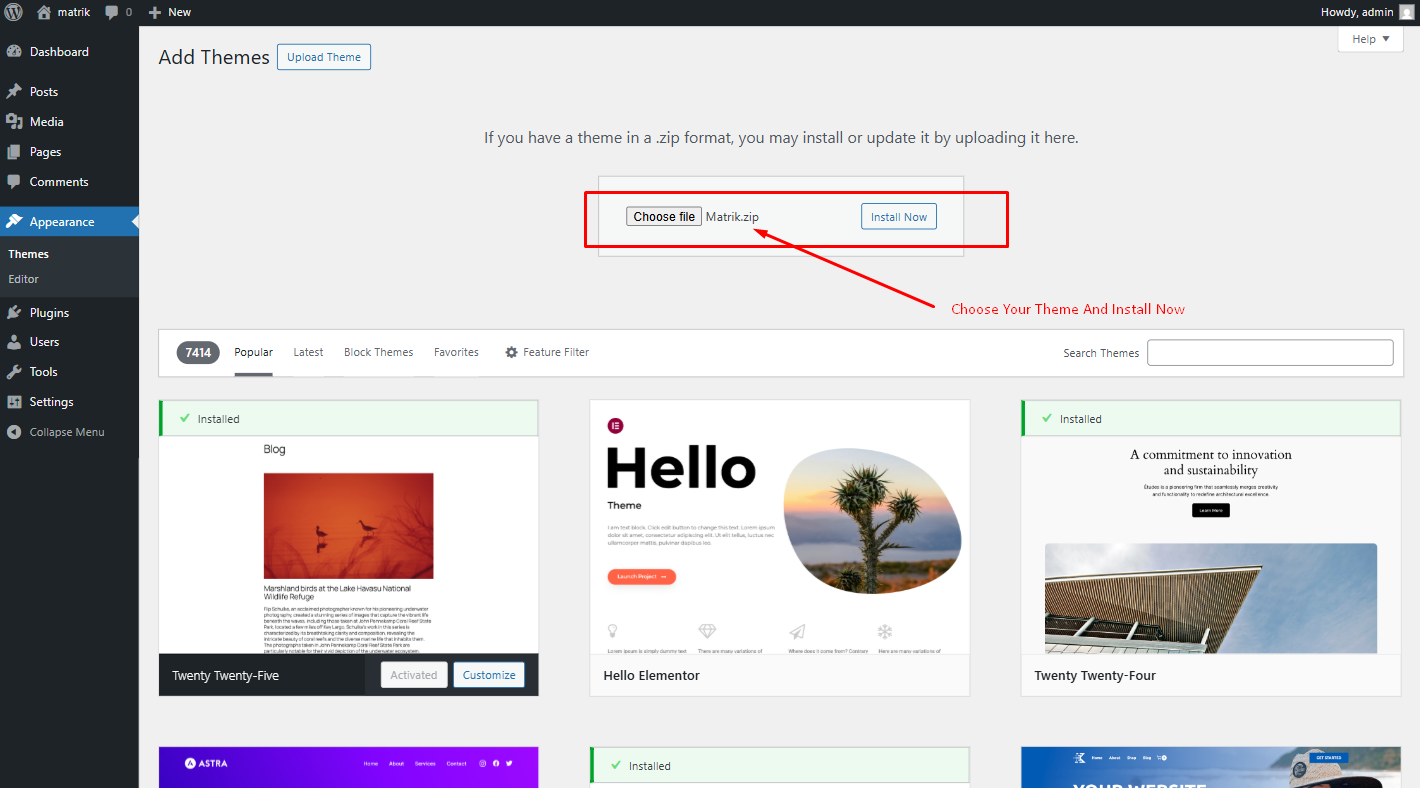
- Choose the zip file you will find within the whole package you downloaded from Themeforest -> "Matrik.zip"
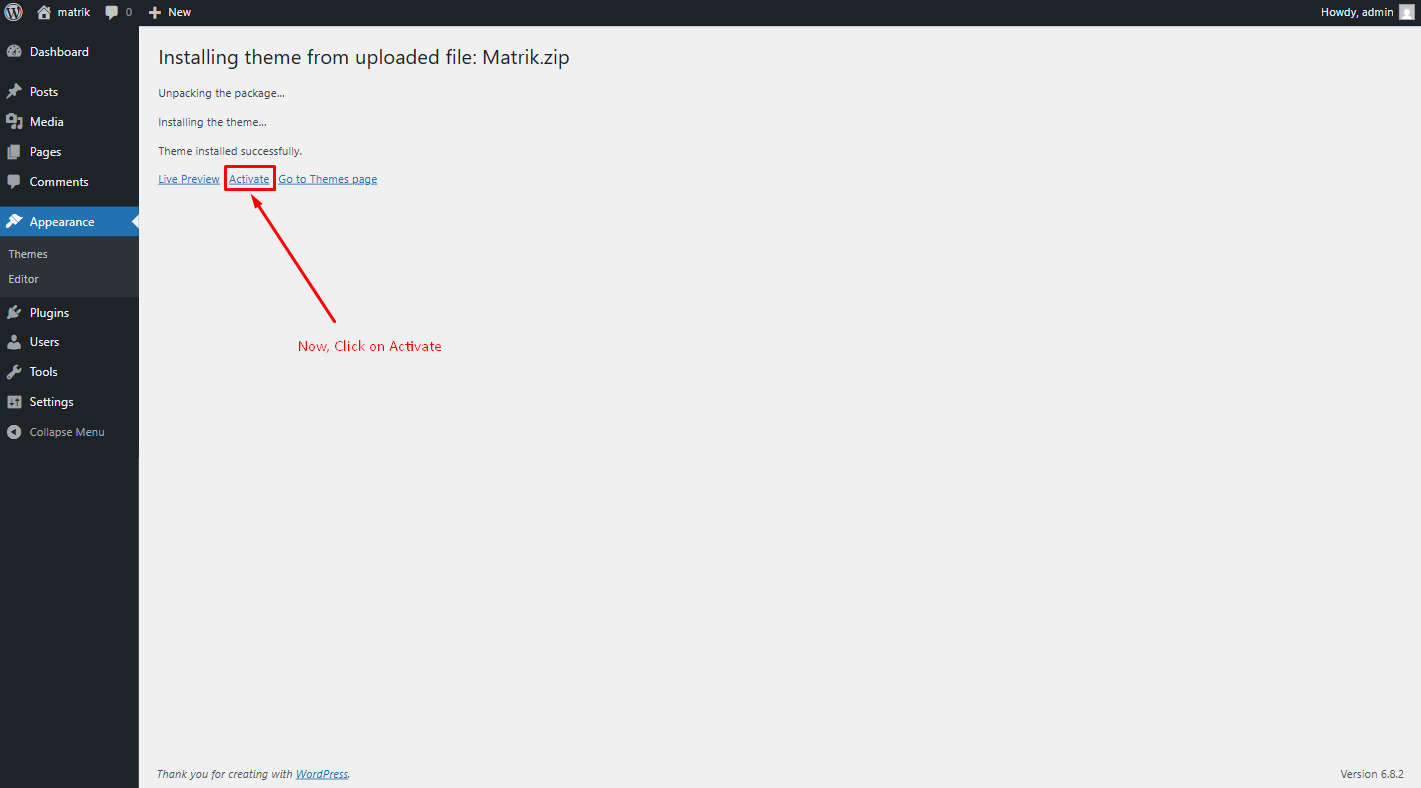
- Once the installation is complete you can Activate the Matrik WordPress Theme
FTP Upload Method
- Using your FTP client, login to your server via FTP and navigate to "wp-content/themes" under your website's root directory.
- Here you must place the main folder you will find within the whole package you downloaded from Themeforest, this folder called "Matrik" ( unzipped version ).
- Once your files are completely uploaded to your server, log into the WordPress Dashboard and go to "Appearance -> Themes" .
- Search the Matrik WordPress Theme Screenshot and click to "Activate".
Theme Installation Tutorial
Screenshot Of whole Process to Install Theme
Choose the zip file what you will find within the whole package you downloaded from Themeforest -> "Matrik.zip"
Now, Click Activate to activate the theme
Plugin Installation
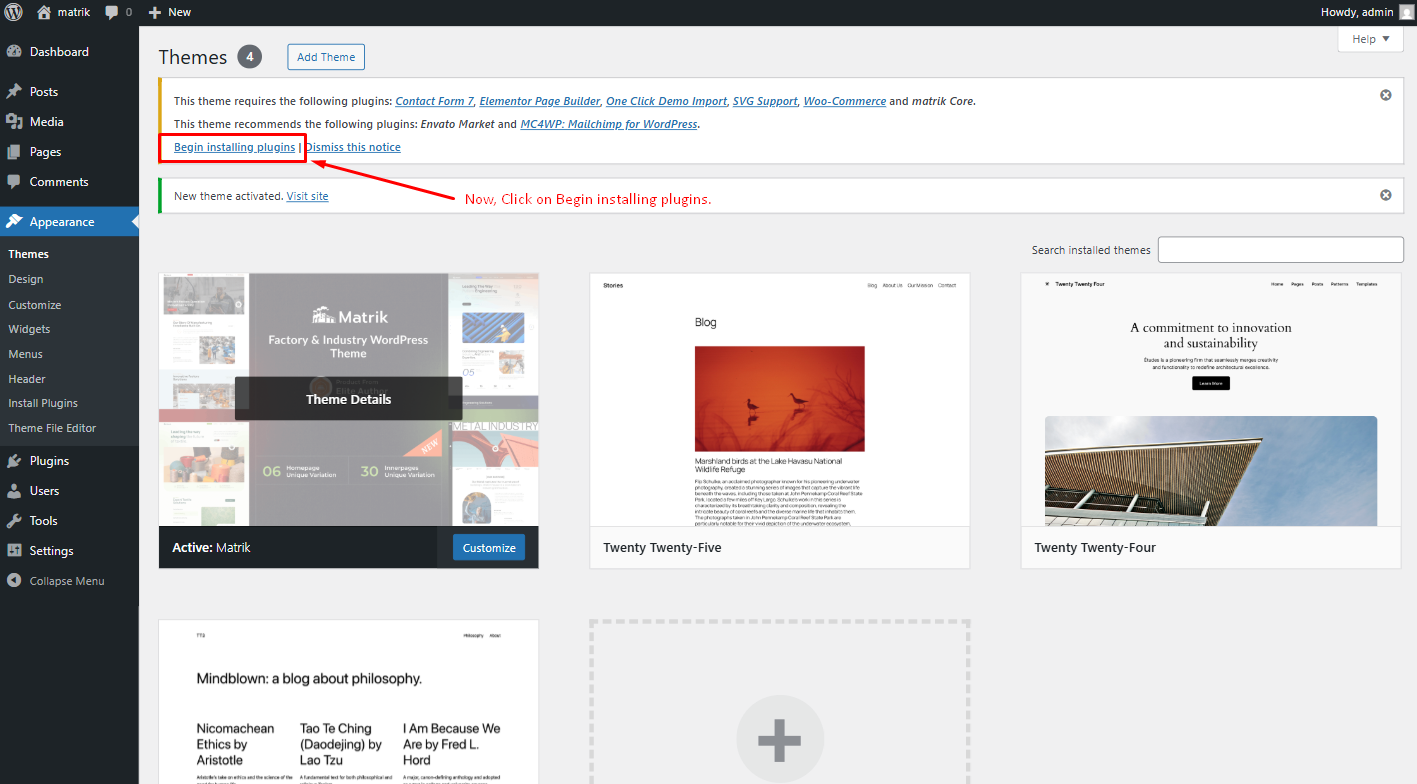
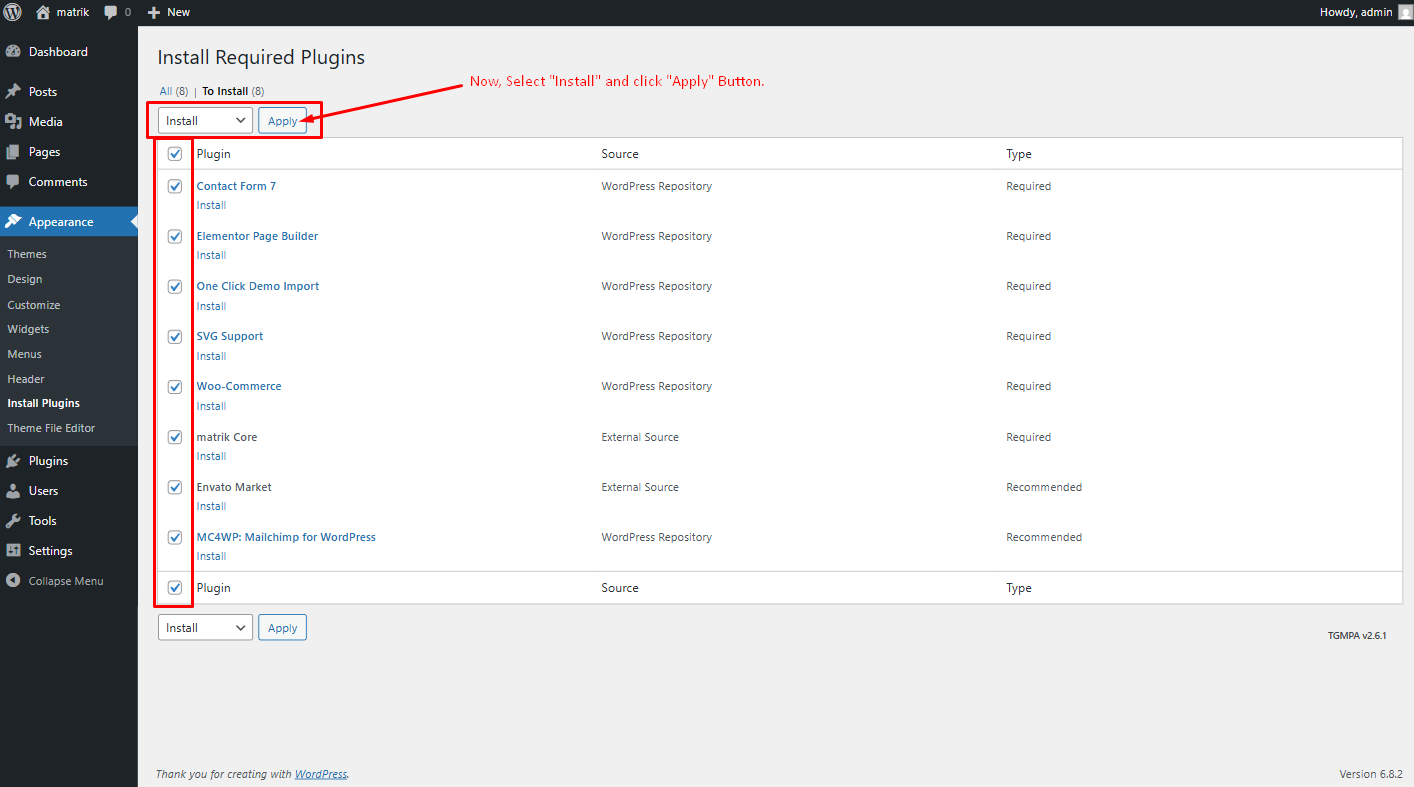
When the theme is uploaded You need to install some recommended plugins.
Click Begin Installing Plugin.
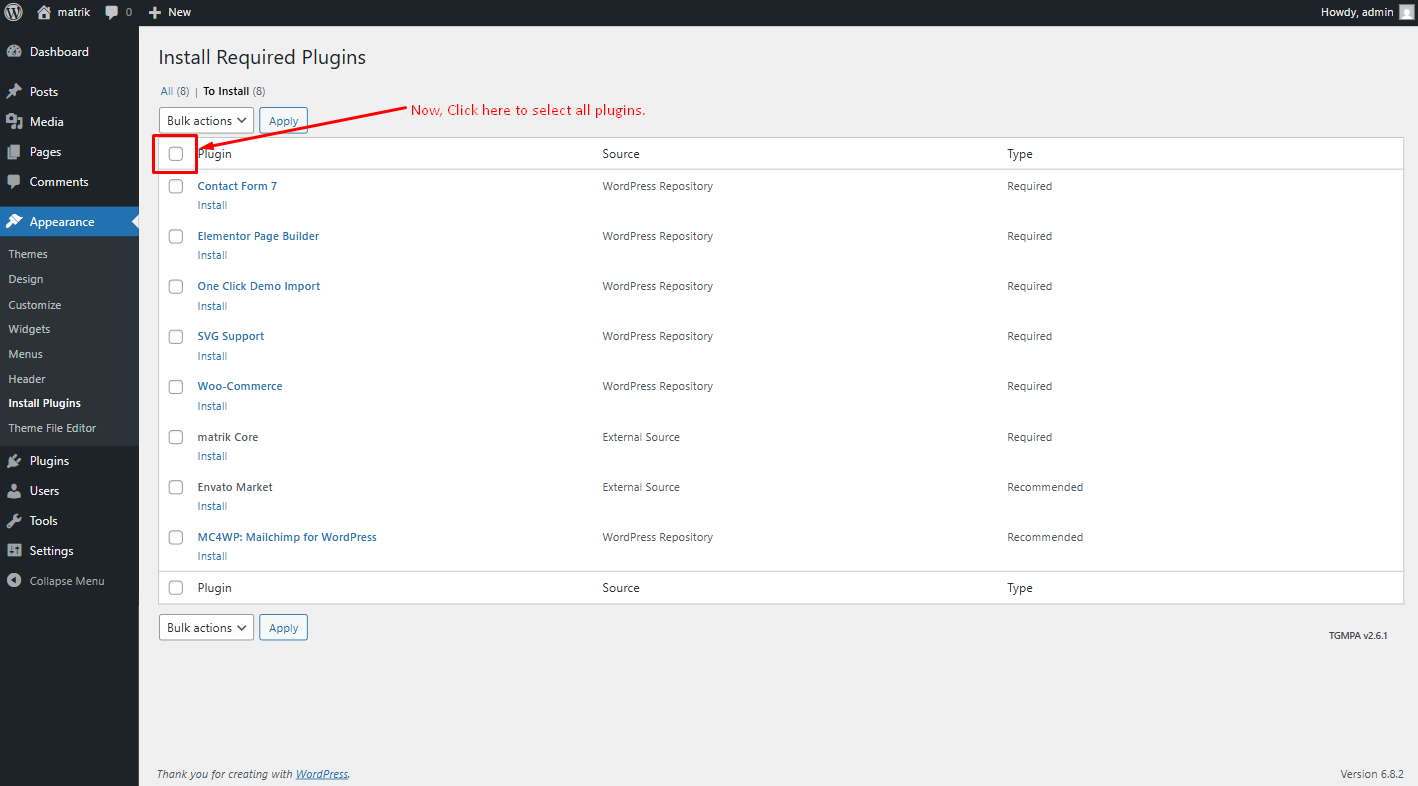
Now, Select all the plugin to install
Now, Select Install then Click Apply button
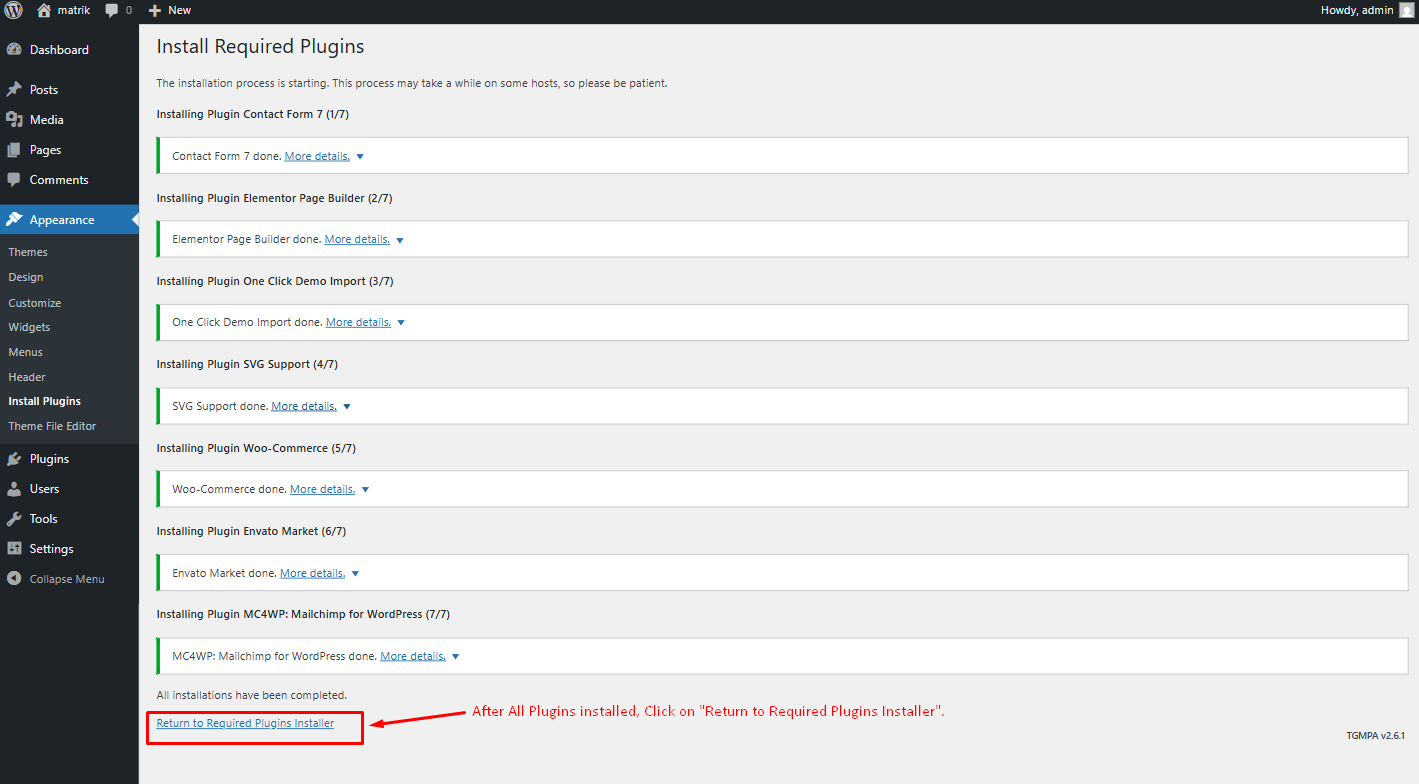
After installing all plugins Click Return to Required Plugins Installer
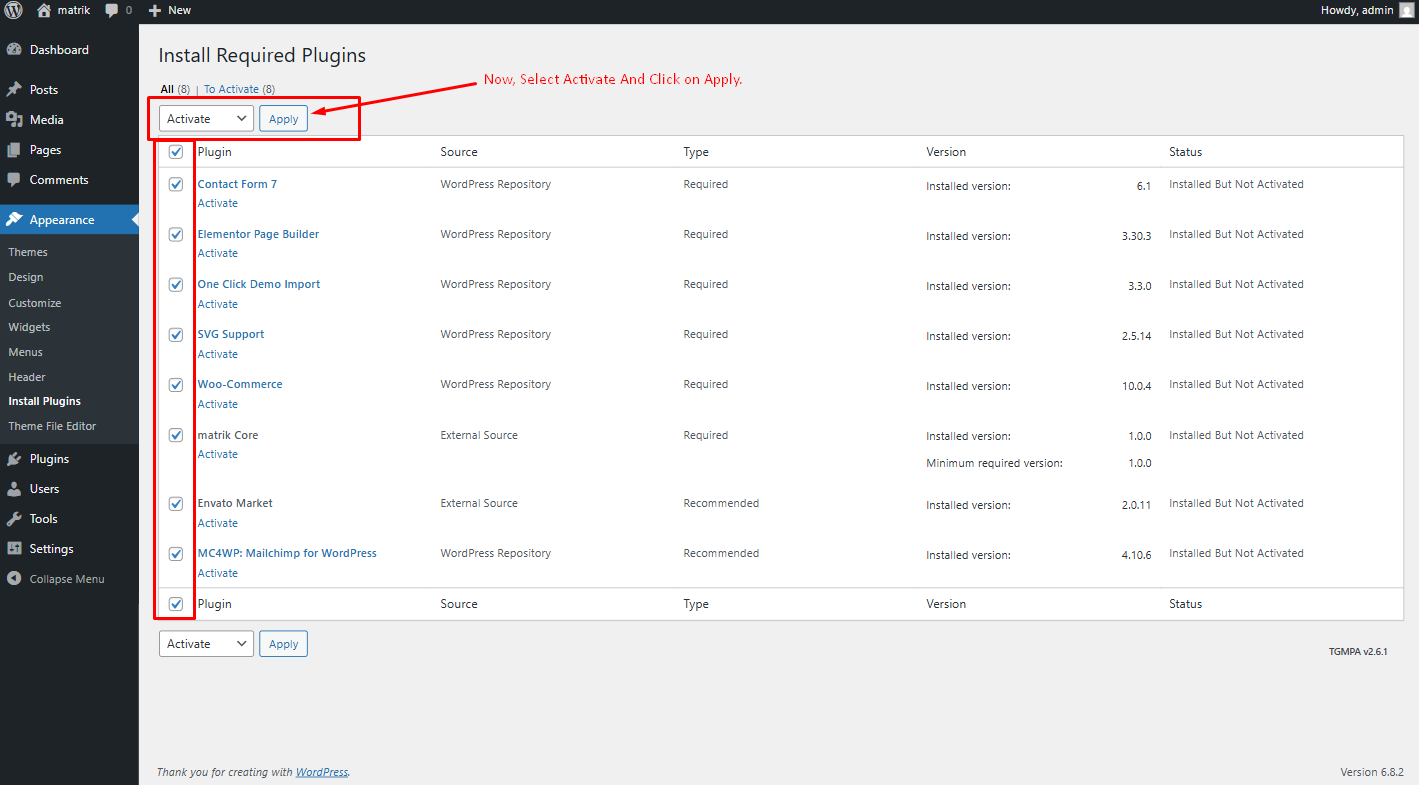
Now, Select Activate then Click Apply for activating all plugins
One Click Demo Import
You can easily import demo data using our one-click demo content importer. View our screenshot to the demo import page.
Set Front Page and Posts Page
You can easily import demo data using our one-click demo content importer. View our screenshot to import demo data in your WordPress site
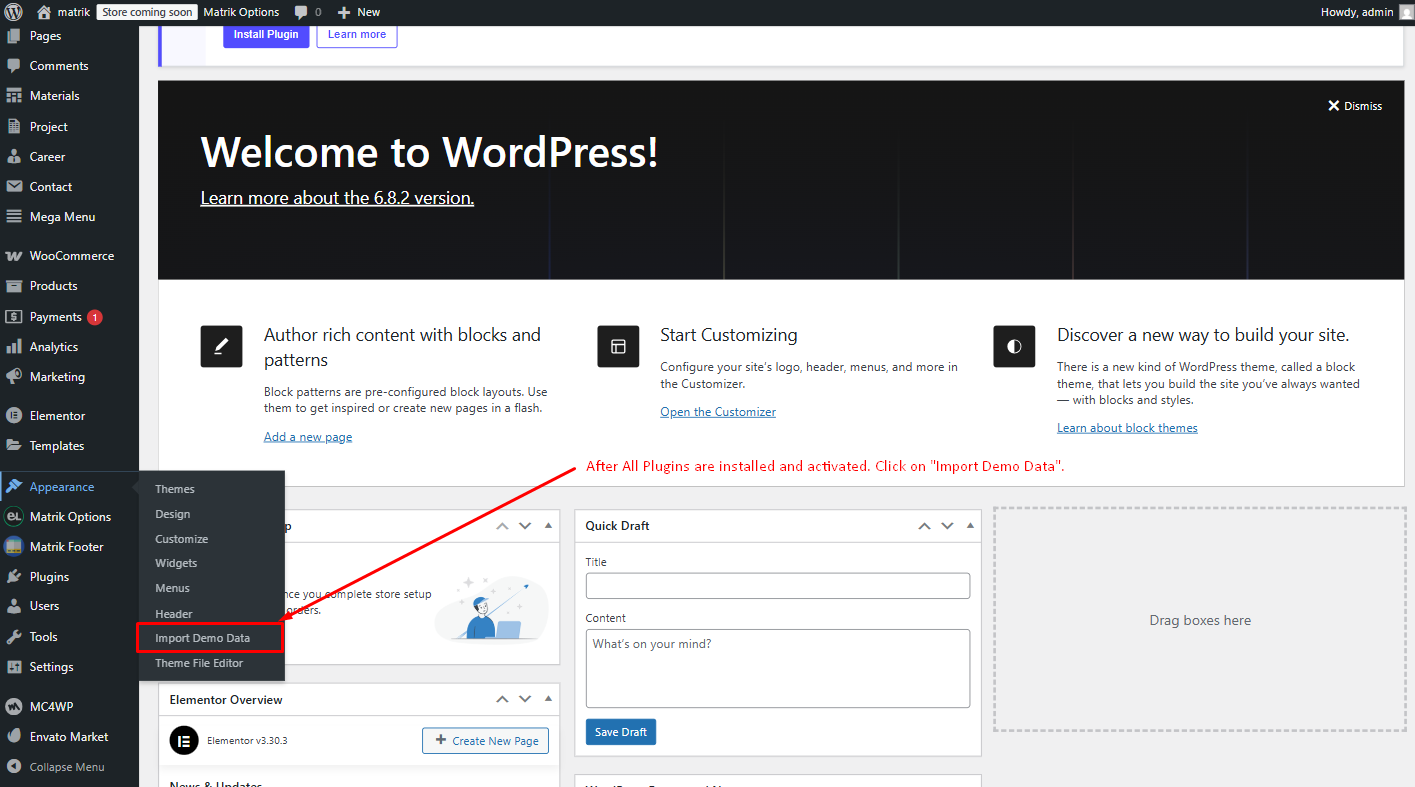
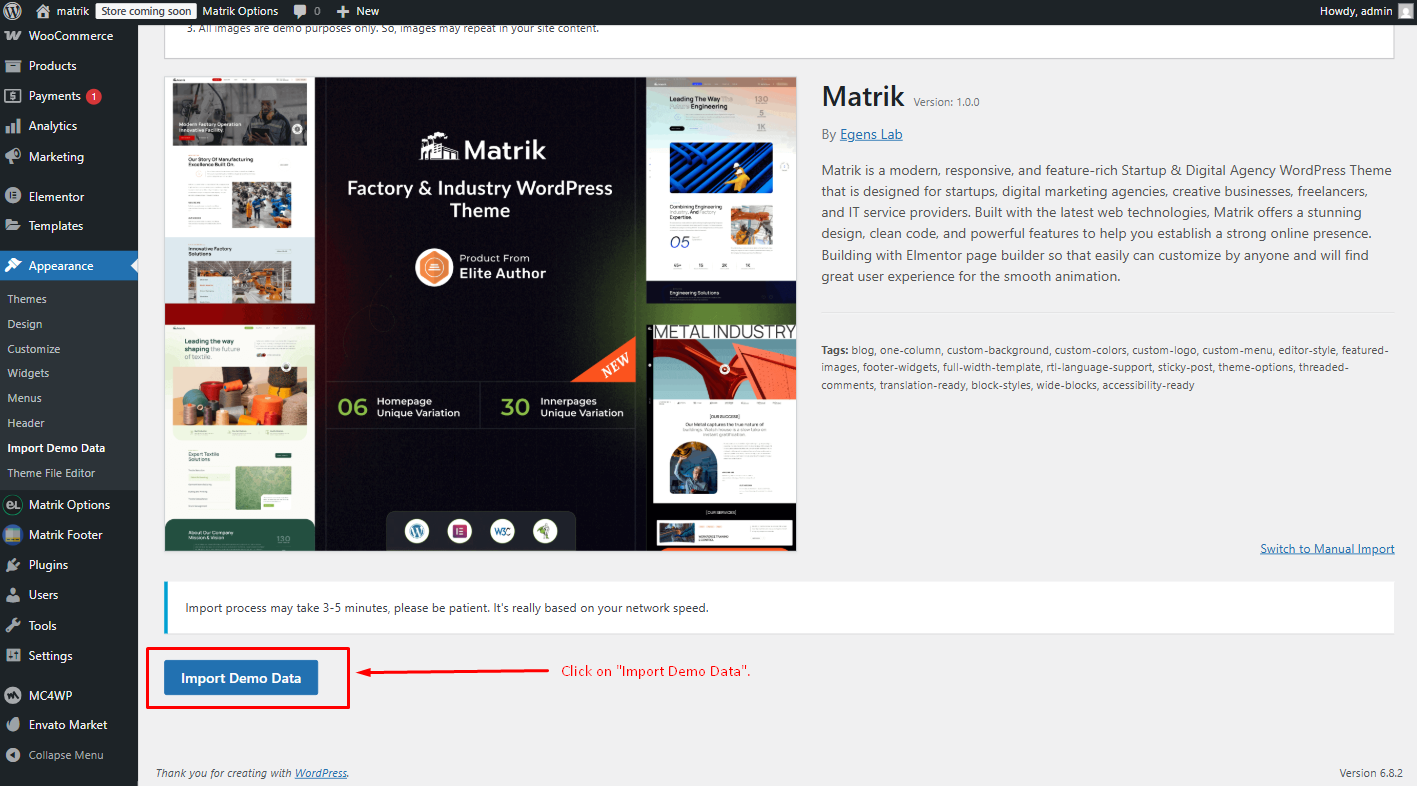
Now Click Import Demo Data
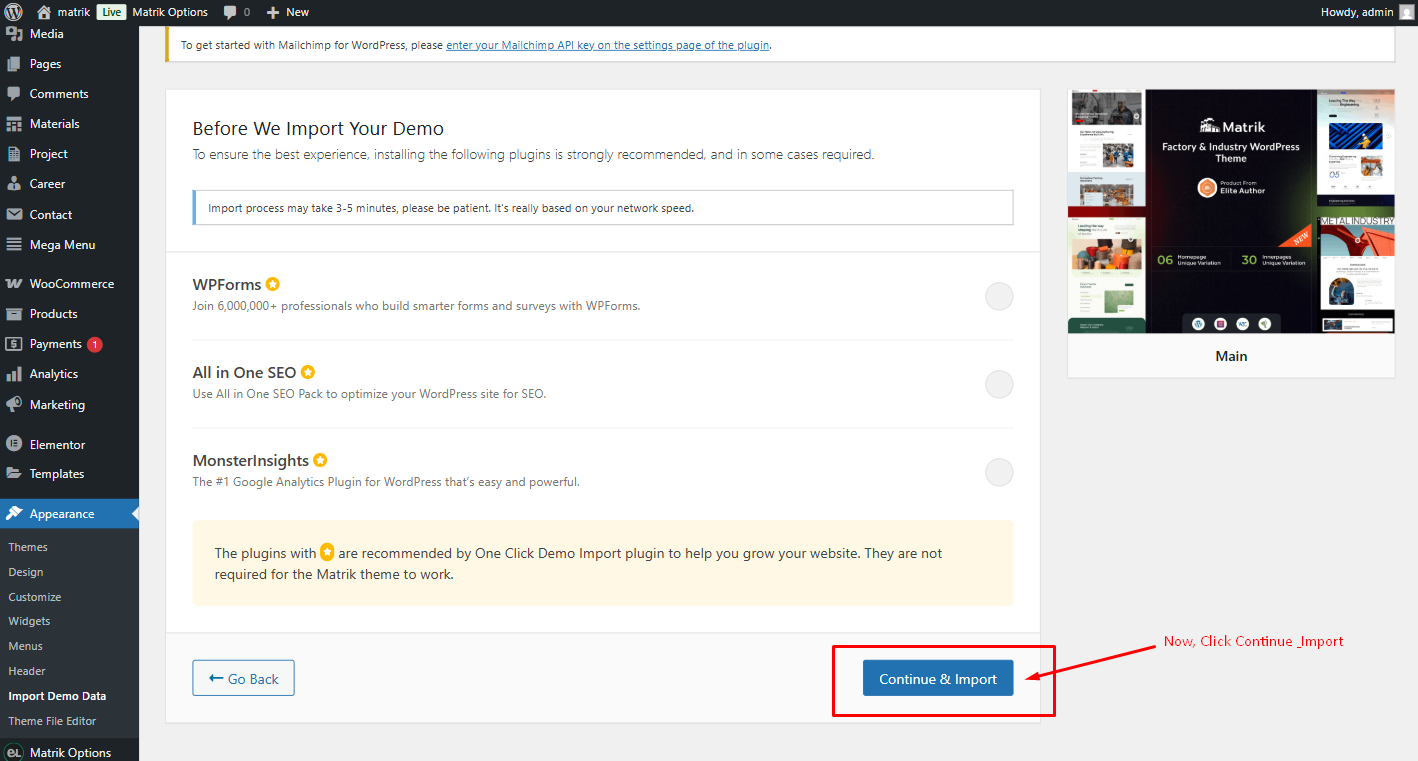
Now, Click Continue & Import
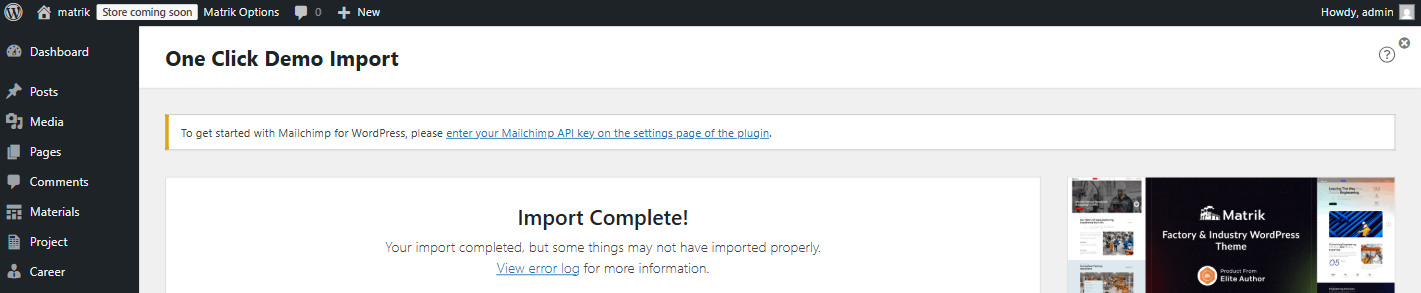
Congrats! Your site is ready..
After import completed successfully, click visit site
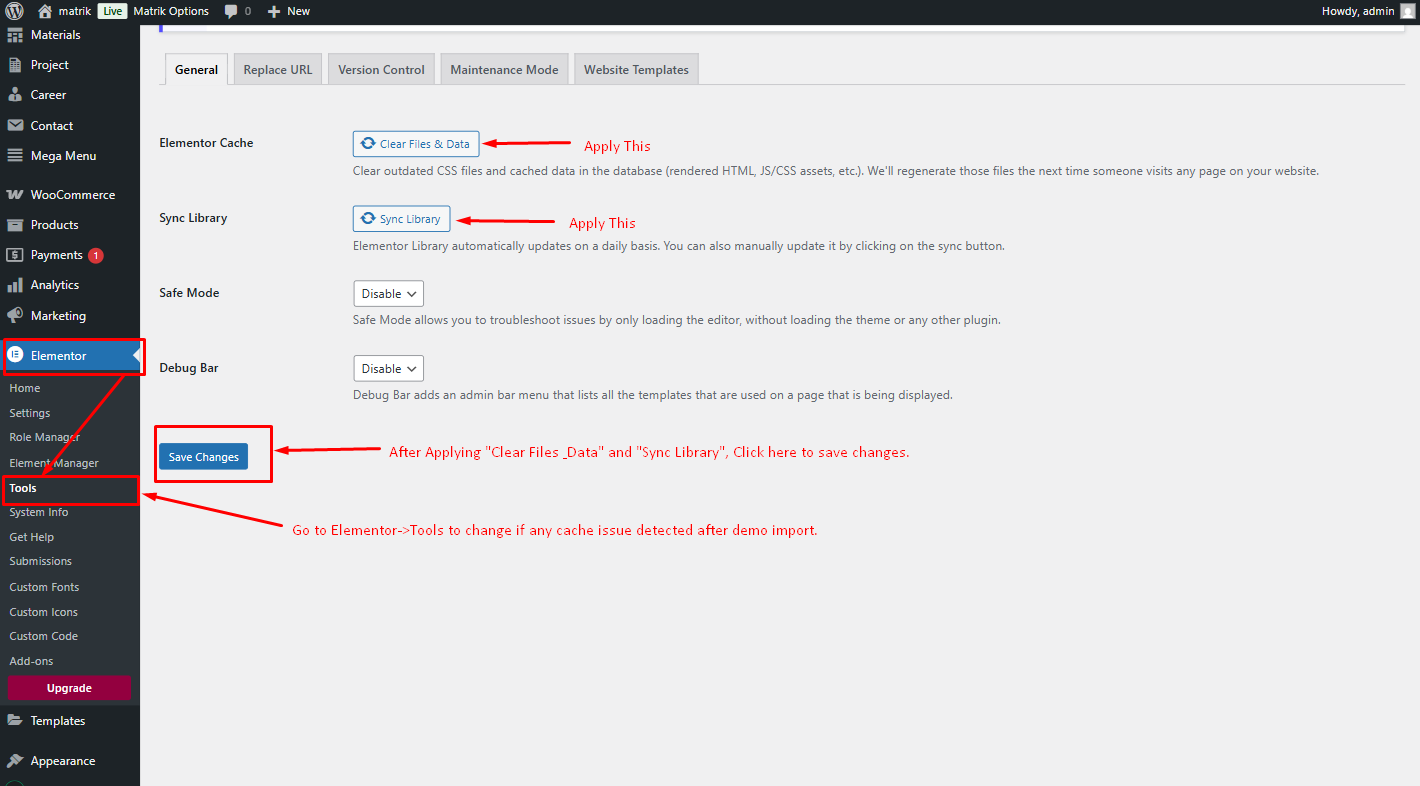
Important Note(Temporary):The PHP v8.4 update for the Elementor plugin may occasionally show a deprecated issue(Elementor is working on fixes with each update).After completing the demo data setup, you might encounter a blank screen. If this happens, don't panic—refer to the image below and follow the instructions to resolve the issue, then visit the website.
Changing Logo & Page Title
You can manage some special Settings from Matrik theme customizer easily. And the other Settings will be found in the theme option panel.
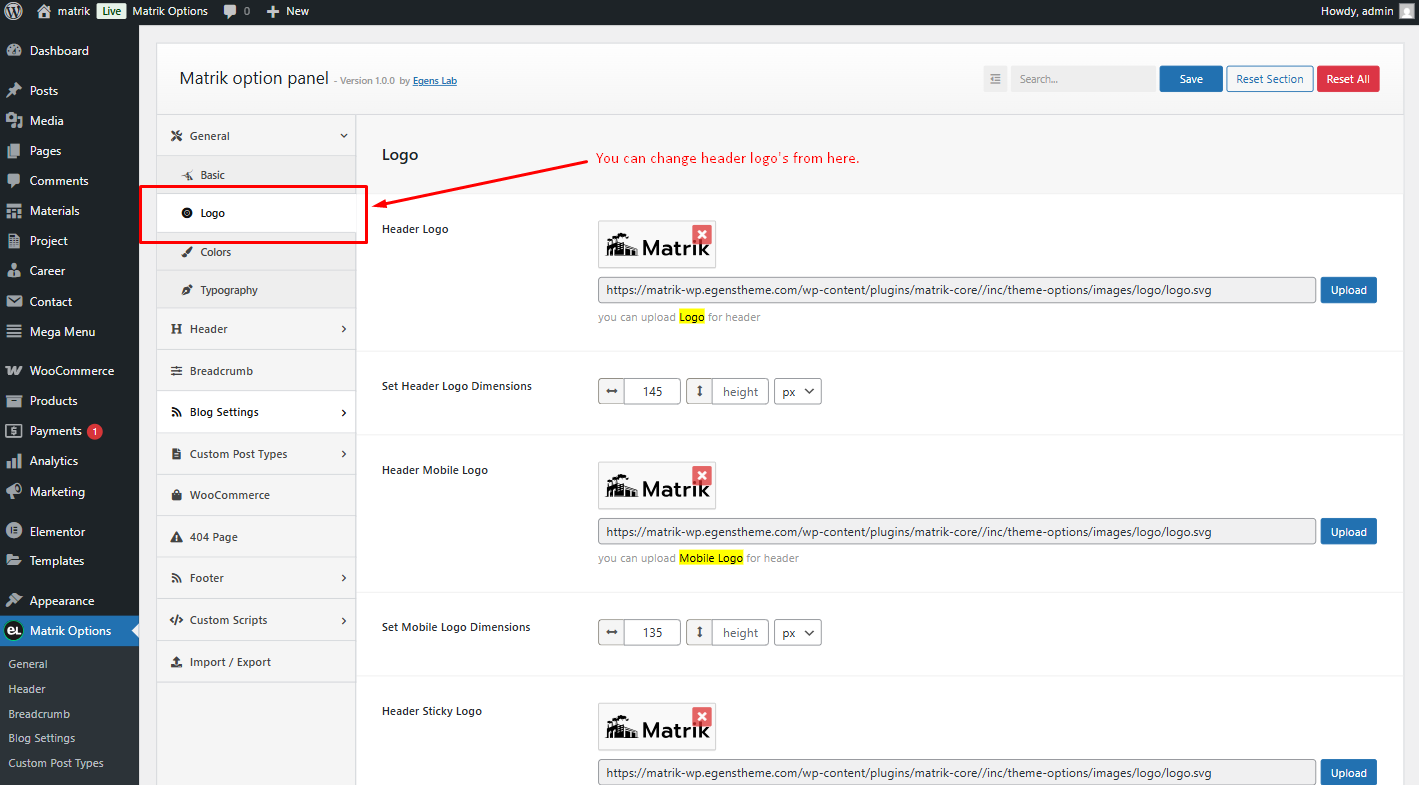
You can change your theme logo from theme options(globally) panel
Note: After changing the global logo in the options panel, some pages may still not show your updated logo. This means that the page has an option to set a separate logo. To fix this, go to the page editor and scroll down. You will see the option to change the logo. Remove the existing logo, update the page, and the global logo from the options panel should now appear. Alternatively, you can manually set a logo specifically for this page.
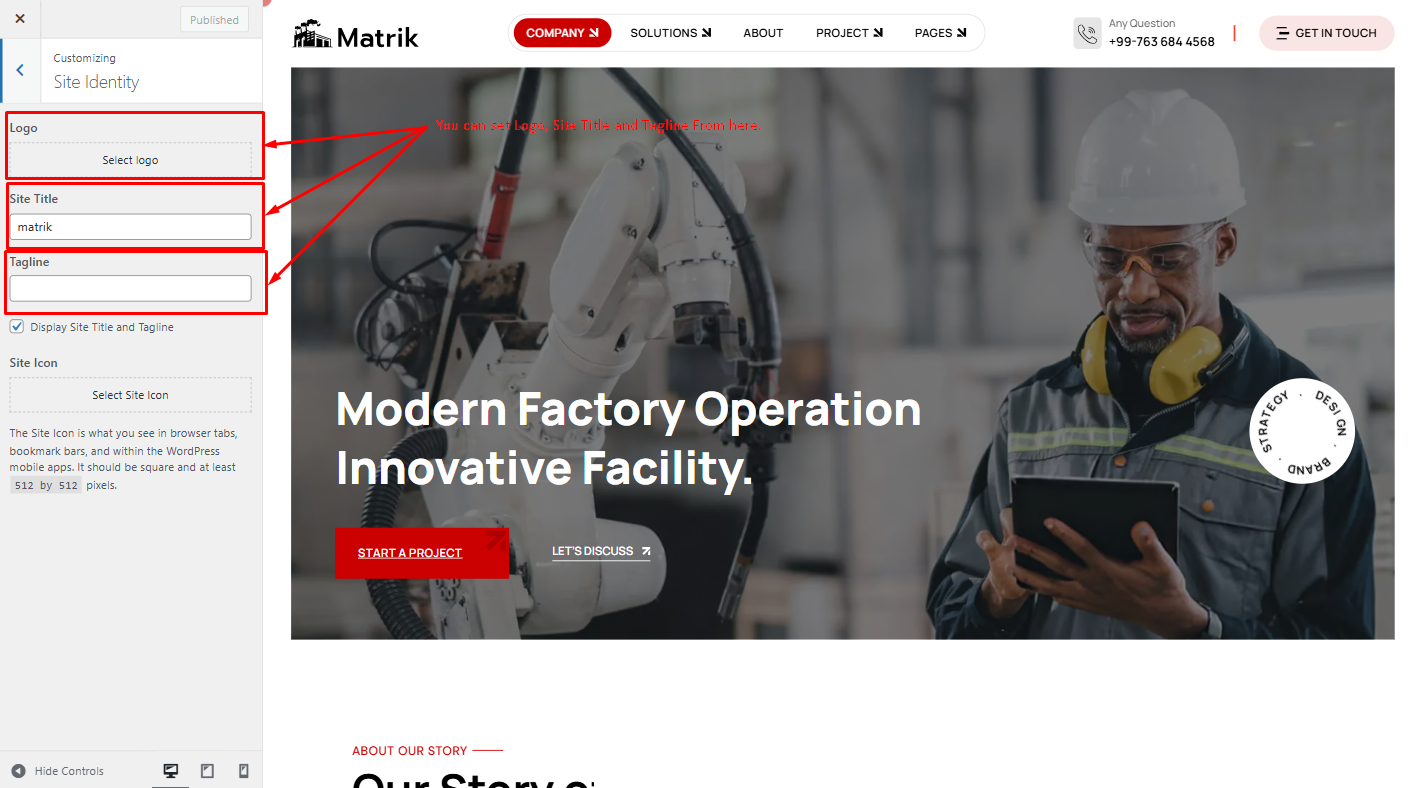
Now, Click on Customize for other options

These options are for the theme Site Title, and Tagline. The logo is not included, as it is now only available through the options panel and page settings.
Setting up the Menu
The final step before you can start with the new theme is to create your menu, it will be really easy. If you import our demo data it will automatically make a menu for you and set it a primary location.
Let's make your own menu.
Go to "Appearance -> Menus" and you will see a panel where you can create new menus. Create one, add your created pages to it and save it. After this in "Menu Settings" below the menu select"Header Menu" and hit "Save Menu".
For One Page Menu you need to use custom links option to make one page menu. Put your section ID in the URL field and menu text goes Link Text field. Then hit Add to Menu Button.
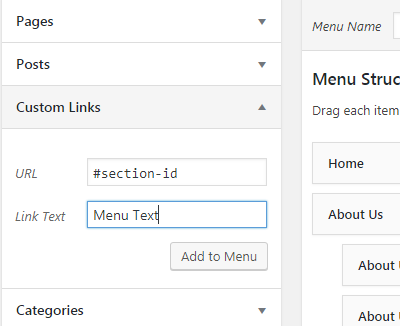
Note: You can use up to two levels of navigation in this theme.
The Customizar
After activating the theme, you will notice that a new submenu item appeared, under "Appearance -> Customize".
If you click on it you will be taken to the WordPress customizer, a tool which will allow you to modify the look and feel of your website.
Unfortunately not all theme options features are present. You can select only the body background color, background image, custom header image, logo & favicon.
Set Homepage and Blogs
- Login to WordPress admin panel (URL should be
www.yourdomain.com/wp-admin) - Navigate to
"Settings > Reading". - From dropdown, select which page you want to set as
"Front Page"and which page you want as“blog posts”page. Default Front Page is‘Home’and default posts page is‘Blog’.. - Click on ‘Save Changes’ button to save all.


Creating A New Page
Step 1: Navigate the Add New menu under the Pages Navigation.
Step 2: Select your header style and Give it a title.
Step 3: Use Elementor for your page Customization.
Elementor Page Builder
Now you can customize the page with elementor page builder.
Contact Form 7
Contact form 7 is used to create ‘easy to handle’ and ‘easy to customize’ forms. Matrik theme has a pre-built forms. To get all forms, ‘Contact Form 7’ plugin must be installed and activated. You can add/edit/delete the contact form by following this documentation
https://contactform7.com/getting-started-with-contact-form-7/
Contact Form
  <div class="row g-4">
      <div class="col-md-12">
          <div class="form-inner">
              <label>Full Name *  </label>
            [text* your-name autocomplete:name]
          </div>
      </div>
      <div class="col-md-6">
          <div class="form-inner">
              <label>Email *  </label>
            [email* your-email autocomplete:email]
          </div>
      </div>
      <div class="col-md-6">
          <div class="form-inner">
              <label>Phone *  </label>
            [tel tel-667]
          </div>
      </div>
      <div class="col-md-12">
          <div class="form-inner">
              <label>Subject  </label>
            [text* your-subject]
          </div>
      </div>
      <div class="col-md-12">
          <div class="form-inner">
              <label>Message *  </label>
            [textarea textarea-299]
          </div>
      </div>
      <div class="col-lg-12">
          <div class="form-inner2">
              <div>
                [checkbox contactCheck "I have read & accepted Terms & Conditions."]

              </div>
          </div>
      </div>
  </div>
  <button type="submit" class="primary-btn4 btn-hover black-bg">
    Submit Now
      <svg class="arrow" width="23" height="23" viewBox="0 0 23 23" xmlns="http://www.w3.org/2000/svg">
          <g>
              <path d="M0.113861 0H22.9999V4.28425L4.32671 22.9997L0 18.7154L12.7524 6.08815L0.113861 6.20089V0Z">  </path>
              <path d="M23 22.9996V8.56848L16.8516 14.6566V22.9996H23Z">  </path>
          </g>
      </svg>
      <span>  </span>
  </button>
Contact Form 1
  <label> Your name
    [text* your-name autocomplete:name]  </label>

 <label> Your email
    [email* your-email autocomplete:email]  </label>

 <label> Subject
    [text* your-subject]  </label>

 <label> Your message (optional)
    [textarea your-message]  </label>

[submit "Submit"]
Contact Form Home Two
               <div class="row g-4">
    <div class="col-md-12">
        <div class="form-inner">
            <label>Full Name *</label>
            [text* text-717]
        </div>
    </div>
    <div class="col-md-6">
        <div class="form-inner">
            <label>Email *</label>
            [email* email-462]
        </div>
    </div>
    <div class="col-md-6">
        <div class="form-inner">
            <label>Phone *</label>
            [text text-256]
        </div>
    </div>
    <div class="col-md-12">
        <div class="form-inner">
            <label>Subject</label>
            [text* text-892]
        </div>
    </div>
    <div class="col-md-12">
        <div class="form-inner">
            <label>Message *</label>
            [textarea textarea-895]
        </div>
    </div>
    <div class="col-lg-12">
        <div class="form-inner2">
            <div class="form-check">
                [acceptance acceptance-120 optional class:form-check-input][/acceptance]
                <label class="form-check-label" for="contactCheck">
                    I have read & accepted Terms & Conditions.
                </label>
            </div>
        </div>
    </div>
</div>
<button type="submit" class="primary-btn3 black-bg">
    <span>Submit Now
    </span>
    <span>Submit Now
    </span>
    <svg class="arrow" width="23" height="23" viewBox="0 0 23 23" xmlns="http://www.w3.org/2000/svg">
        <g>
            <path d="M0.113861 0H22.9999V4.28425L4.32671 22.9997L0 18.7154L12.7524 6.08815L0.113861 6.20089V0Z"></path>
            <path d="M23 22.9996V8.56848L16.8516 14.6566V22.9996H23Z"></path>
        </g>
    </svg>
</button>
Contact Form
  <div class="row g-4">
      <div class="col-md-12">
          <div class="form-inner">
              <label>Full Name *  </label>
            [text* your-name autocomplete:name]
          </div>
      </div>
      <div class="col-md-6">
          <div class="form-inner">
              <label>Email *  </label>
            [email* your-email autocomplete:email]
          </div>
      </div>
      <div class="col-md-6">
          <div class="form-inner">
              <label>Phone *  </label>
            [tel tel-667]
          </div>
      </div>
      <div class="col-md-12">
          <div class="form-inner">
              <label>Subject  </label>
            [text* your-subject]
          </div>
      </div>
      <div class="col-md-12">
          <div class="form-inner">
              <label>Message *  </label>
            [textarea textarea-299]
          </div>
      </div>
      <div class="col-lg-12">
          <div class="form-inner2">
              <div>
                [checkbox contactCheck "I have read & accepted Terms & Conditions."]

              </div>
          </div>
      </div>
  </div>
  <button type="submit" class="primary-btn4 btn-hover black-bg">
    Submit Now
      <svg class="arrow" width="23" height="23" viewBox="0 0 23 23" xmlns="http://www.w3.org/2000/svg">
          <g>
              <path d="M0.113861 0H22.9999V4.28425L4.32671 22.9997L0 18.7154L12.7524 6.08815L0.113861 6.20089V0Z">  </path>
              <path d="M23 22.9996V8.56848L16.8516 14.6566V22.9996H23Z">  </path>
          </g>
      </svg>
      <span>  </span>
  </button>
Contact Form Home Five
 <div class="row g-4">
    <div class="col-md-12">
        <div class="form-inner">
            <label>Full Name *</label>
            [text text-472]
        </div>
    </div>
    <div class="col-md-6">
        <div class="form-inner">
            <label>Email *</label>
            [email* email-592]
        </div>
    </div>
    <div class="col-md-6">
        <div class="form-inner">
            <label>Phone *</label>
            [text text-337]
        </div>
    </div>
    <div class="col-md-12">
        <div class="form-inner">
            <label>Subject</label>
            [text text-539]
        </div>
    </div>
    <div class="col-md-12">
        <div class="form-inner">
            <label>Message *</label>
            [textarea textarea-996]
        </div>
    </div>
    <div class="col-lg-12">
        <div class="form-inner2">
            <div class="form-check">
                [acceptance acceptance-388 optional class:form-check-input] [/acceptance]
                <label class="form-check-label" for="contactCheck">
                    I have read & accepted Terms & Conditions.
                </label>
            </div>
        </div>
    </div>
</div>
<button type="submit" class="primary-btn5 two btn-hover">
    Submit Now
    <svg class="arrow" width="23" height="23" viewBox="0 0 23 23" xmlns="http://www.w3.org/2000/svg">
        <g>
            <path d="M0.113861 0H22.9999V4.28425L4.32671 22.9997L0 18.7154L12.7524 6.08815L0.113861 6.20089V0Z"></path>
            <path d="M23 22.9996V8.56848L16.8516 14.6566V22.9996H23Z"></path>
        </g>
    </svg>
    <span></span>
</button>
Contact Form Home Six
 <div class="row g-4">
    <div class="col-md-12">
        <div class="form-inner">
            <label>Full Name *</label>
            [text text-894]
        </div>
    </div>
    <div class="col-md-6">
        <div class="form-inner">
            <label>Email *</label>
            [email* email-710]
        </div>
    </div>
    <div class="col-md-6">
        <div class="form-inner">
            <label>Phone *</label>
            [text text-463]
        </div>
    </div>
    <div class="col-md-12">
        <div class="form-inner">
            <label>Subject</label>
            [text text-612]
        </div>
    </div>
    <div class="col-md-12">
        <div class="form-inner">
            <label>Message *</label>
            [textarea textarea-604]
        </div>
    </div>
    <div class="col-lg-12">
        <div class="form-inner2">
            <div class="form-check">
                [acceptance acceptance-144 optional class:form-check-input][/acceptance]
                <label class="form-check-label" for="contactCheck">
                    I have read & accepted Terms & Conditions.
                </label>
            </div>
        </div>
    </div>
</div>
<button type="submit" class="primary-btn6">
    Submit Now
    <svg width="28" height="28" viewBox="0 0 28 28" xmlns="http://www.w3.org/2000/svg">
        <g>
            <path d="M14.1952 0.936056L27.5226 14.2634L25.0277 16.7583L3.25495 16.7829L3.23022 11.7684L18.0098 11.8413L10.5842 4.54707L14.1952 0.936056Z"></path>
            <path d="M14.1298 27.657L22.5336 19.2532L15.4078 19.218L10.5493 24.0765L14.1298 27.657Z"></path>
        </g>
    </svg>
</button>
Footer Five Form
 <div class="form-inner">
    [email* email-53 placeholder "Enter Email"]
    <button type="submit">
        <svg width="16" height="16" viewBox="0 0 16 16" xmlns="http://www.w3.org/2000/svg">
            <path d="M15.9647 0.685806C16.0011 0.594942 16.01 0.495402 15.9904 0.399526C15.9707 0.303649 15.9233 0.215653 15.8541 0.146447C15.7849 0.0772403 15.6969 0.0298668 15.601 0.0101994C15.5052 -0.0094681 15.4056 -0.000564594 15.3147 0.0358061L0.76775 5.85481H0.76675L0.31475 6.03481C0.22914 6.06895 0.154635 6.1261 0.0994654 6.19994C0.0442956 6.27377 0.0106078 6.36142 0.00212322 6.4532C-0.00636132 6.54497 0.0106876 6.63731 0.0513867 6.72001C0.0920859 6.8027 0.154851 6.87254 0.23275 6.92181L0.64275 7.18181L0.64375 7.18381L5.63875 10.3618L8.81675 15.3568L8.81875 15.3588L9.07875 15.7688C9.12817 15.8464 9.19805 15.9089 9.28068 15.9493C9.36332 15.9897 9.45551 16.0066 9.54711 15.998C9.63871 15.9894 9.72617 15.9558 9.79985 15.9007C9.87354 15.8456 9.9306 15.7712 9.96475 15.6858L15.9647 0.685806ZM14.1317 2.57581L6.63775 10.0698L6.42275 9.73181C6.38336 9.66978 6.33078 9.6172 6.26875 9.57781L5.93075 9.36281L13.4247 1.86881L14.6027 1.39781L14.1327 2.57581H14.1317Z">
            </path>
        </svg>
    </button>
</div>
Footer Six Top Form
<div class="form-inner">
    [email* email-896 placeholder "Enter Email"]
    <div class="btn-grp">
        <button type="submit">Subscribe</button>
        <button type="submit" class="send-btn">
            <svg width="20" height="20" viewBox="0 0 20 20" xmlns="http://www.w3.org/2000/svg">
                <path d="M19.9566 0.857204C20.0021 0.743631 20.0132 0.619214 19.9886 0.499376C19.9641 0.379538 19.9049 0.26955 19.8184 0.183047C19.7318 0.0965444 19.6219 0.0373312 19.502 0.0127484C19.3822 -0.0118344 19.2578 -0.000705698 19.1442 0.0447548L0.96158 7.31805H0.96033L0.395366 7.54304C0.28836 7.58572 0.195235 7.65715 0.126277 7.74944C0.0573191 7.84172 0.015212 7.95128 0.00460698 8.06599C-0.00599803 8.18071 0.0153118 8.29612 0.0661825 8.39948C0.117053 8.50285 0.195505 8.59014 0.292872 8.65172L0.80534 8.9767L0.80659 8.9792L7.04995 12.9515L11.0222 19.1948L11.0247 19.1973L11.3497 19.7098C11.4115 19.8068 11.4988 19.8848 11.6021 19.9354C11.7054 19.9859 11.8206 20.007 11.9351 19.9963C12.0496 19.9856 12.1589 19.9434 12.251 19.8746C12.3431 19.8057 12.4144 19.7128 12.4571 19.606L19.9566 0.857204ZM17.6655 3.21956L8.29862 12.5865L8.02989 12.164C7.98065 12.0865 7.91493 12.0208 7.8374 11.9715L7.41493 11.7028L16.7818 2.33586L18.2542 1.74715L17.6668 3.21956H17.6655Z"></path>
            </svg>
        </button>
    </div>
</div>
Career Form
<div class="single-info mb-50">
    <h4 class="info-title">Personal Info</h4>
    <div class="row g-4">
        <div class="col-md-12">
            <div class="form-inner">
                <label>Full Name</label>
                [text text-515 placeholder "Mr. Daniel Scoot"]
            </div>
        </div>
        <div class="col-md-6">
            <div class="form-inner">
                <label>Your Email*</label>
                [email* email-432 placeholder "[email protected]"]
            </div>
        </div>
        <div class="col-md-6">
            <div class="form-inner">
                <label>Phone Number</label>
                [text text-327 placeholder "+920- 5566 **** ****"]
            </div>
        </div>
    </div>
</div>
<div class="single-info mb-50">
    <h5 class="info-title">Career Info</h5>
    <div class="row g-4">
        <div class="col-md-6">
            <div class="form-inner">
                <label>Current Job</label>
                [text text-398 placeholder "Egenslab"]
            </div>
        </div>
        <div class="col-md-6">
            <div class="form-inner">
                <label>Current Position</label>
                [text text-290 placeholder "UI/UX Designer"]
            </div>
        </div>
        <div class="col-md-6">
            <div class="form-inner">
                <label>Experiences*</label>
                [number number-914 min:1 "1"]
            </div>
        </div>
        <div class="col-md-6">
            <div class="form-inner">
                <label>Current Salary</label>
                [text text-378 placeholder "$90K"]
            </div>
        </div>
        <div class="col-md-6">
            <div class="form-inner">
                <label>Applied Position*</label>

                [select select-212 first_as_label "Digital Marketer" "UX/UI Designer" "Frontend Developer" "Software Engineer"]


            </div>
        </div>
        <div class="col-md-6">
            <div class="form-inner">
                <label>Expecetd Salary*</label>
                [text text-30 placeholder "Type amount"]
            </div>
        </div>
    </div>
</div>
<div class="single-info mb-50">
    <h5 class="info-title">Key Documents</h5>
    <div class="row">
        <div class="col-md-12">
            <div class="form-inner mb-25">
                <label>Cover Letter*</label>
                [textarea textarea-31 placeholder] Write cover letter [/textarea]
            </div>
        </div>
        <div class="col-md-12">
            <div class="form-inner mb-25">
                <label>Upload Your CV*</label>
                <div class="file-upload-area">
                    <div class="icon">
                        <svg width="20" height="20" viewBox="0 0 20 20" fill="none" xmlns="http://www.w3.org/2000/svg">
                            <path fill-rule="evenodd" clip-rule="evenodd" d="M5.12322 0H11.8099L17.477 5.90705V17.3963C17.477 18.8356 16.3126 20 14.8783 20H5.12322C3.68394 20 2.51953 18.8356 2.51953 17.3963V2.60369C2.51951 1.16441 3.68392 0 5.12322 0Z" fill="#E5252A"></path>
                            <path opacity="0.302" fill-rule="evenodd" clip-rule="evenodd" d="M11.8047 0V5.86207H17.4769L11.8047 0Z" fill="white"></path>
                            <path d="M5.41406 14.9227V11.2695H6.96829C7.3531 11.2695 7.65796 11.3745 7.88784 11.5894C8.11772 11.7993 8.23267 12.0841 8.23267 12.4389C8.23267 12.7938 8.11772 13.0786 7.88784 13.2885C7.65796 13.5034 7.3531 13.6084 6.96829 13.6084H6.3486V14.9227H5.41406ZM6.3486 12.8138H6.86334C7.00326 12.8138 7.11321 12.7838 7.18819 12.7138C7.26314 12.6489 7.30314 12.5589 7.30314 12.439C7.30314 12.319 7.26316 12.2291 7.18819 12.1641C7.11324 12.0941 7.00329 12.0642 6.86334 12.0642H6.3486V12.8138ZM8.61746 14.9227V11.2695H9.91181C10.1667 11.2695 10.4066 11.3045 10.6314 11.3795C10.8563 11.4544 11.0612 11.5594 11.2411 11.7043C11.4211 11.8442 11.566 12.0341 11.6709 12.274C11.7709 12.5139 11.8259 12.7888 11.8259 13.0986C11.8259 13.4035 11.7709 13.6783 11.6709 13.9182C11.566 14.1581 11.4211 14.348 11.2411 14.4879C11.0612 14.6328 10.8563 14.7378 10.6314 14.8128C10.4066 14.8877 10.1667 14.9227 9.91181 14.9227H8.61746ZM9.532 14.1281H9.80186C9.94678 14.1281 10.0817 14.1131 10.2067 14.0781C10.3266 14.0432 10.4415 13.9882 10.5515 13.9132C10.6564 13.8383 10.7414 13.7333 10.8014 13.5934C10.8613 13.4535 10.8913 13.2885 10.8913 13.0986C10.8913 12.9037 10.8613 12.7388 10.8014 12.5989C10.7414 12.459 10.6564 12.354 10.5515 12.279C10.4415 12.2041 10.3266 12.1491 10.2067 12.1141C10.0817 12.0792 9.94678 12.0641 9.80186 12.0641H9.532V14.1281ZM12.2956 14.9227V11.2695H14.8943V12.0641H13.2302V12.6488H14.5595V13.4385H13.2302V14.9227H12.2956Z" fill="white"></path>
                        </svg>
                    </div>
                    [file file-3 class:custom-upload filetypes:audio/*|video/*|image/* limit:1mb]
                </div>
            </div>
        </div>
        <div class="col-md-12">
            <div class="form-inner2">
                <div class="form-check">
                    [acceptance acceptance-508 optional class:form-check-input][/acceptance]
                    <label class="form-check-label" for="contactCheck1">
                        By applying, you will agree our <span>privacy-policy & terms conditions.</span>
                    </label>
                </div>
            </div>
        </div>
    </div>
</div>
<div class="form-inner">
    <button class="primary-btn3 three btn-hover" type="submit">
        Apply Position
        <svg width="10" height="10" viewBox="0 0 10 10" xmlns="http://www.w3.org/2000/svg">
            <path d="M1 9L9 1M9 1C7.22222 1.33333 3.33333 2 1 1M9 1C8.66667 2.66667 8 6.33333 9 9" stroke-width="1.5" stroke-linecap="round"></path>
        </svg>
        <span></span>
    </button>
</div>
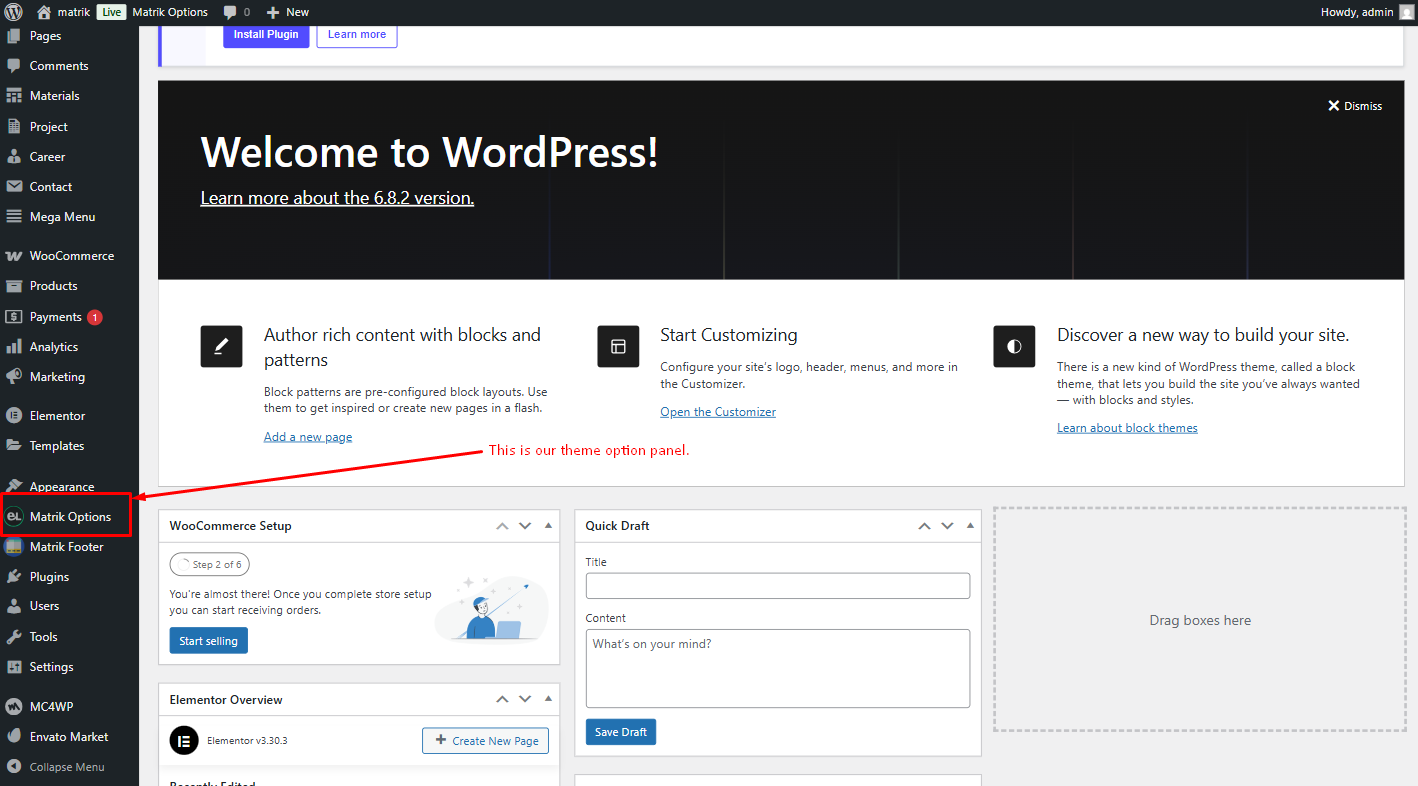
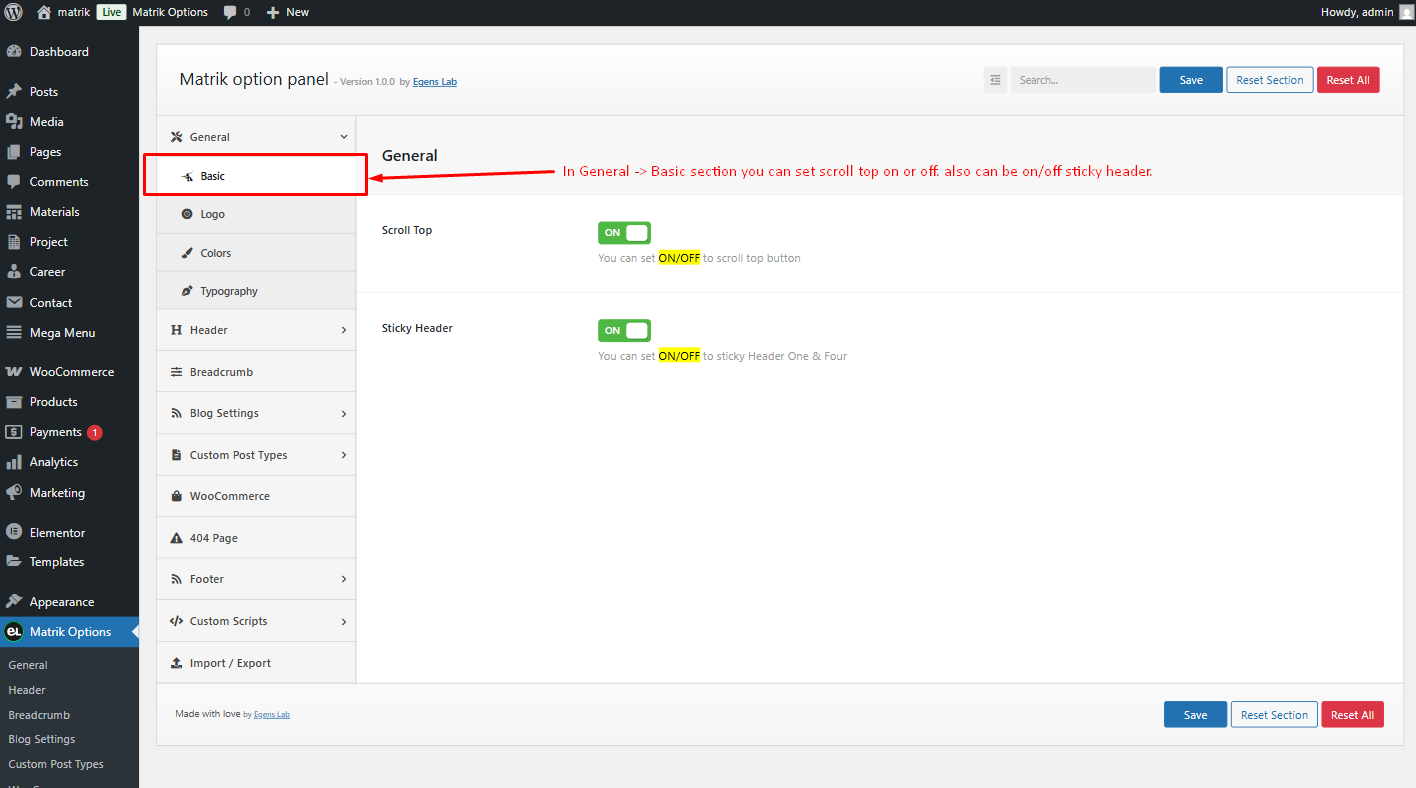
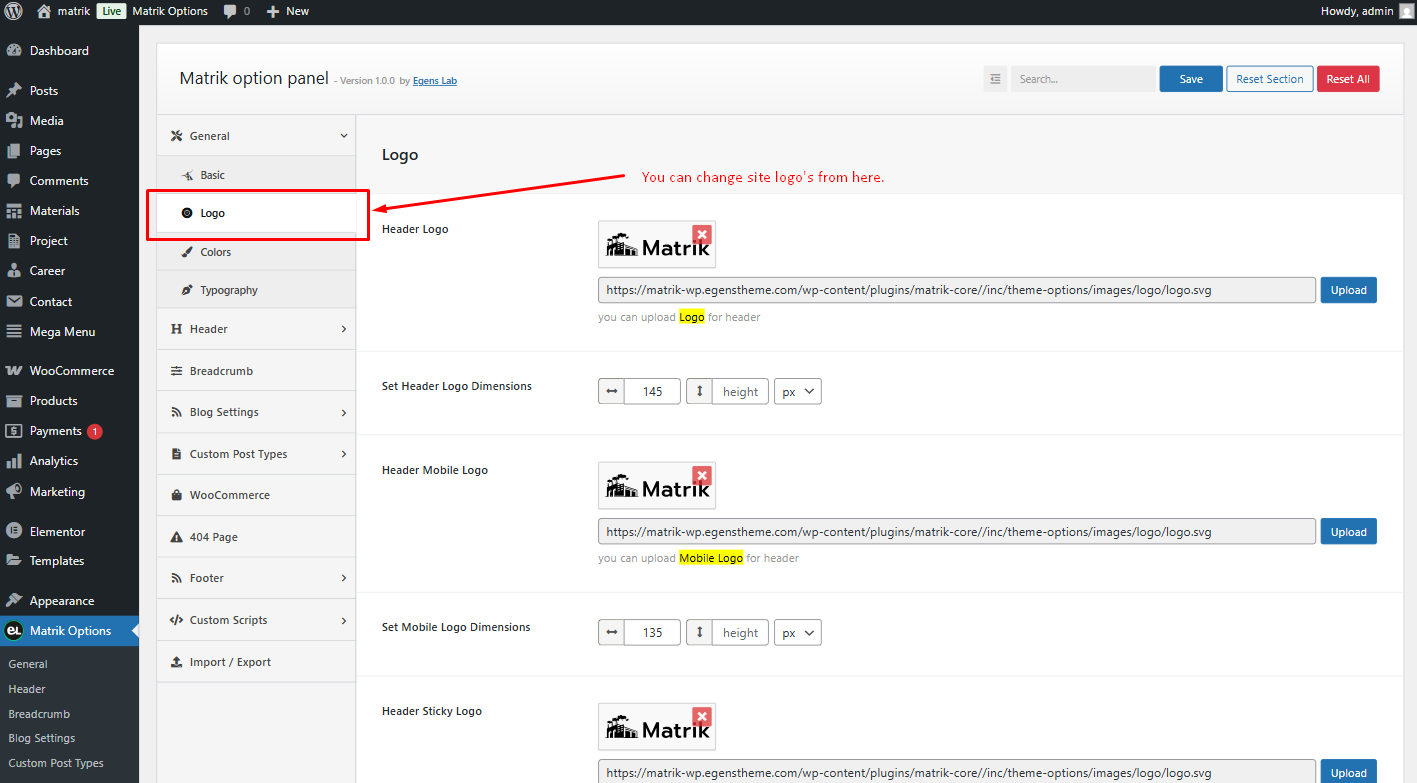
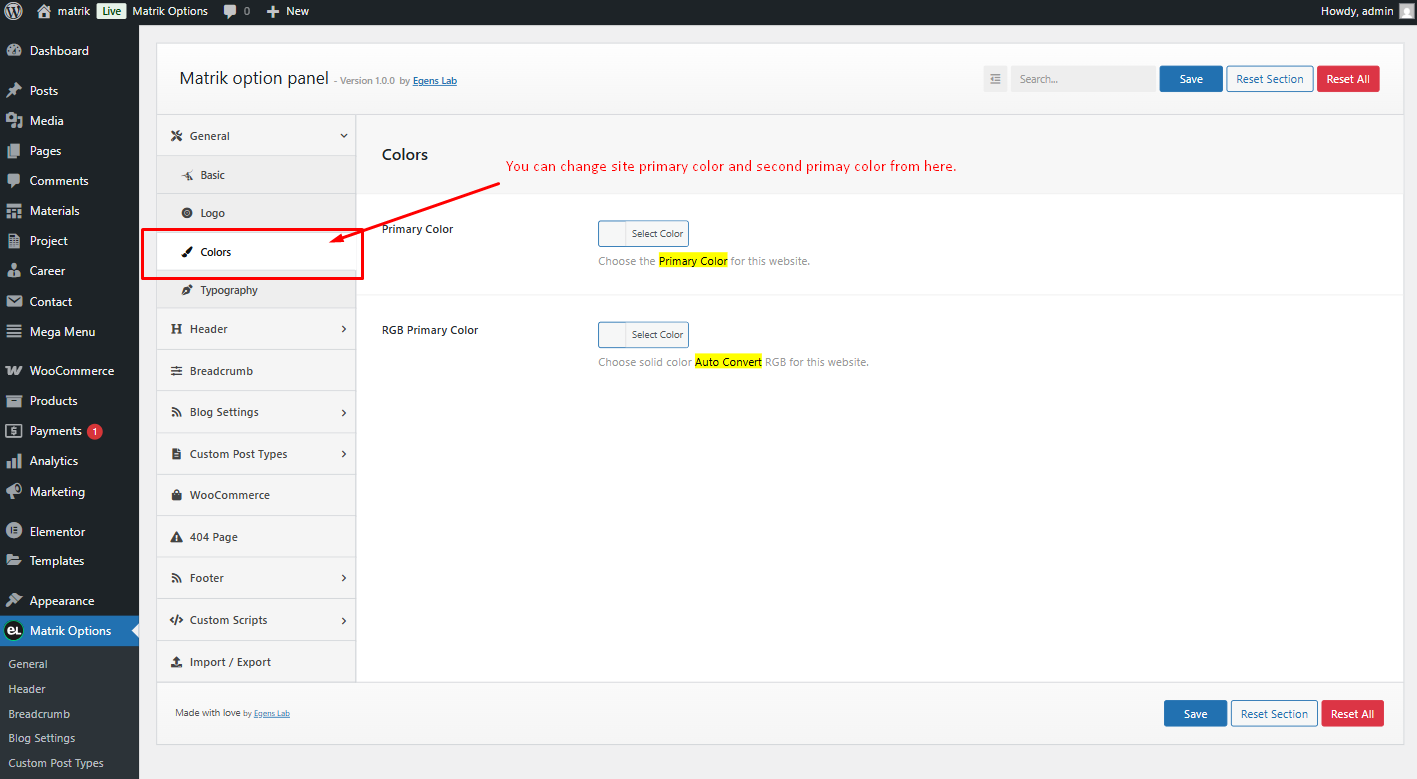
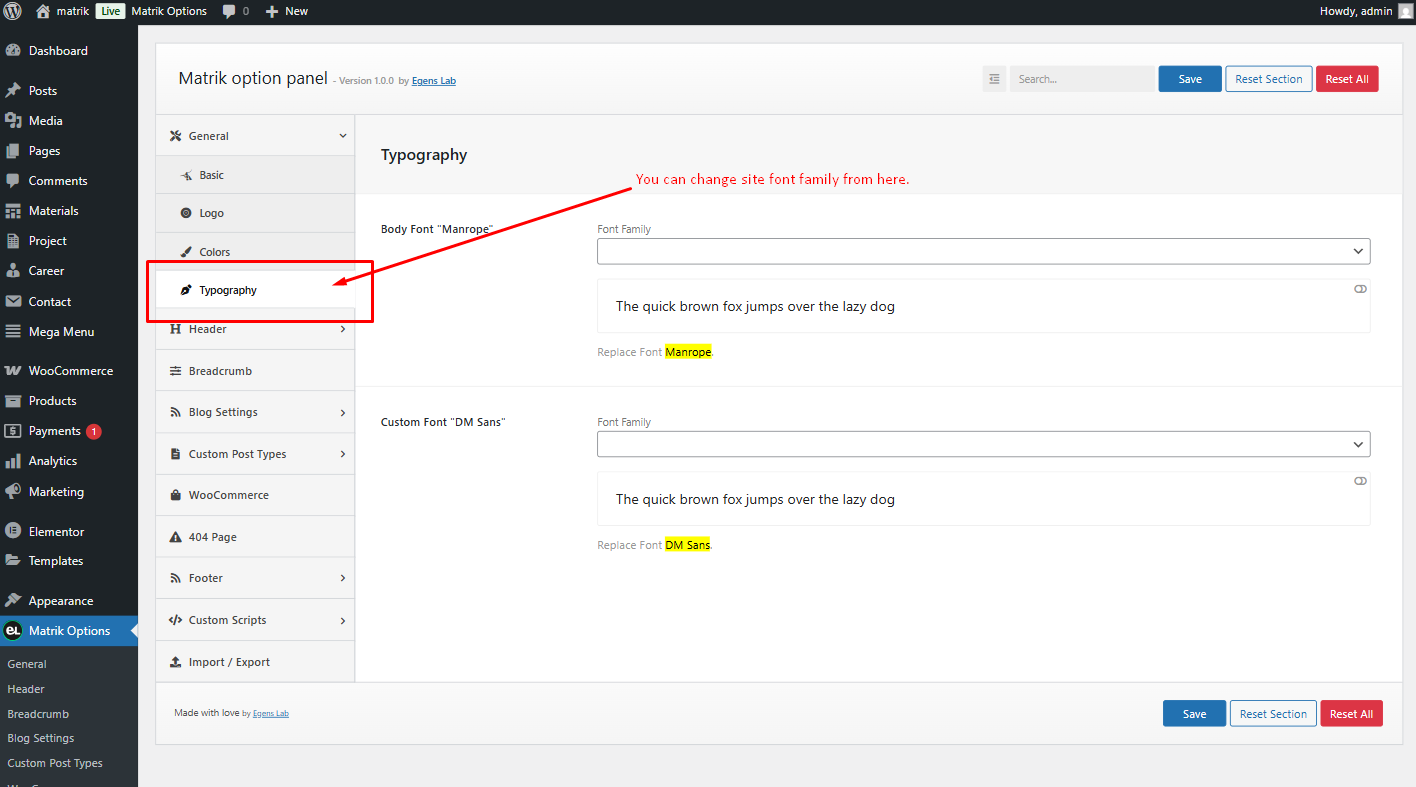
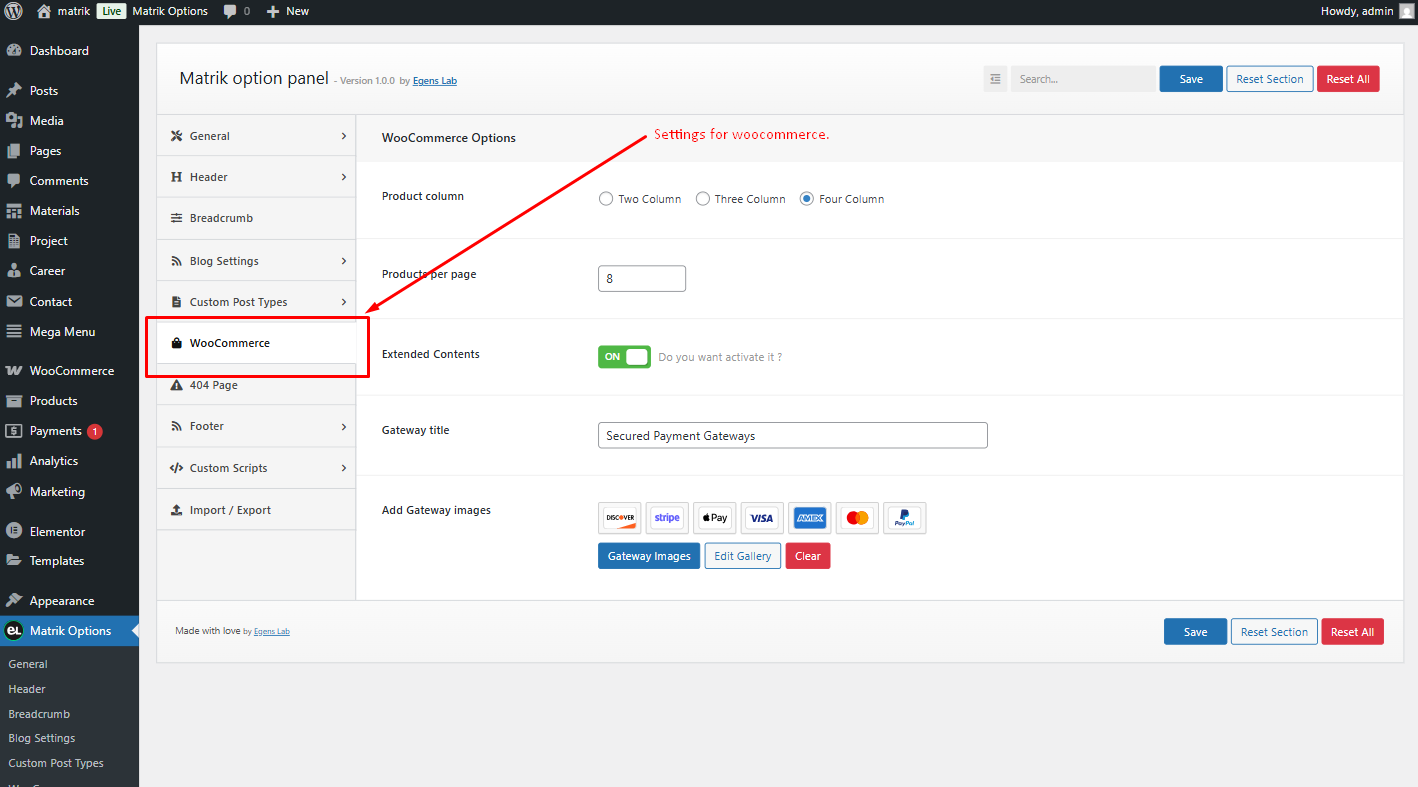
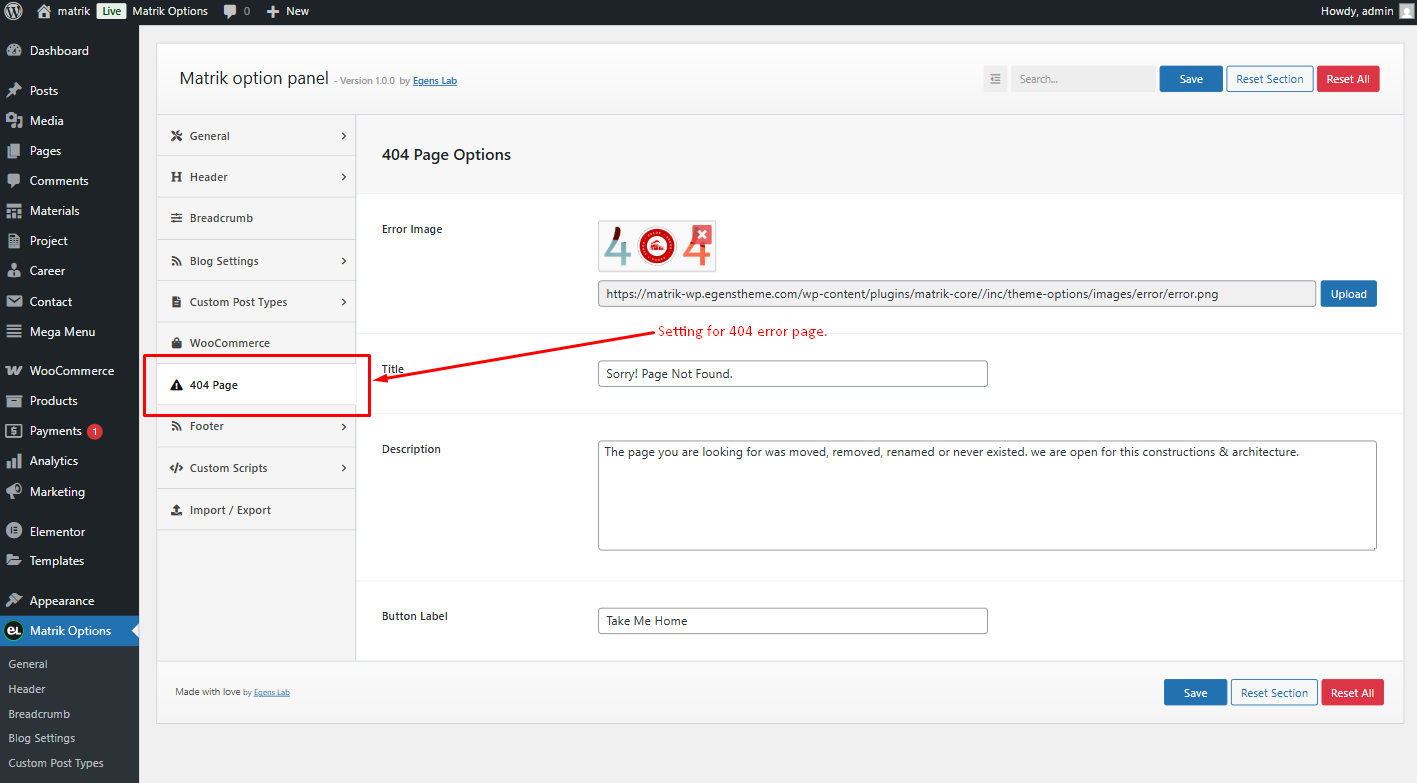
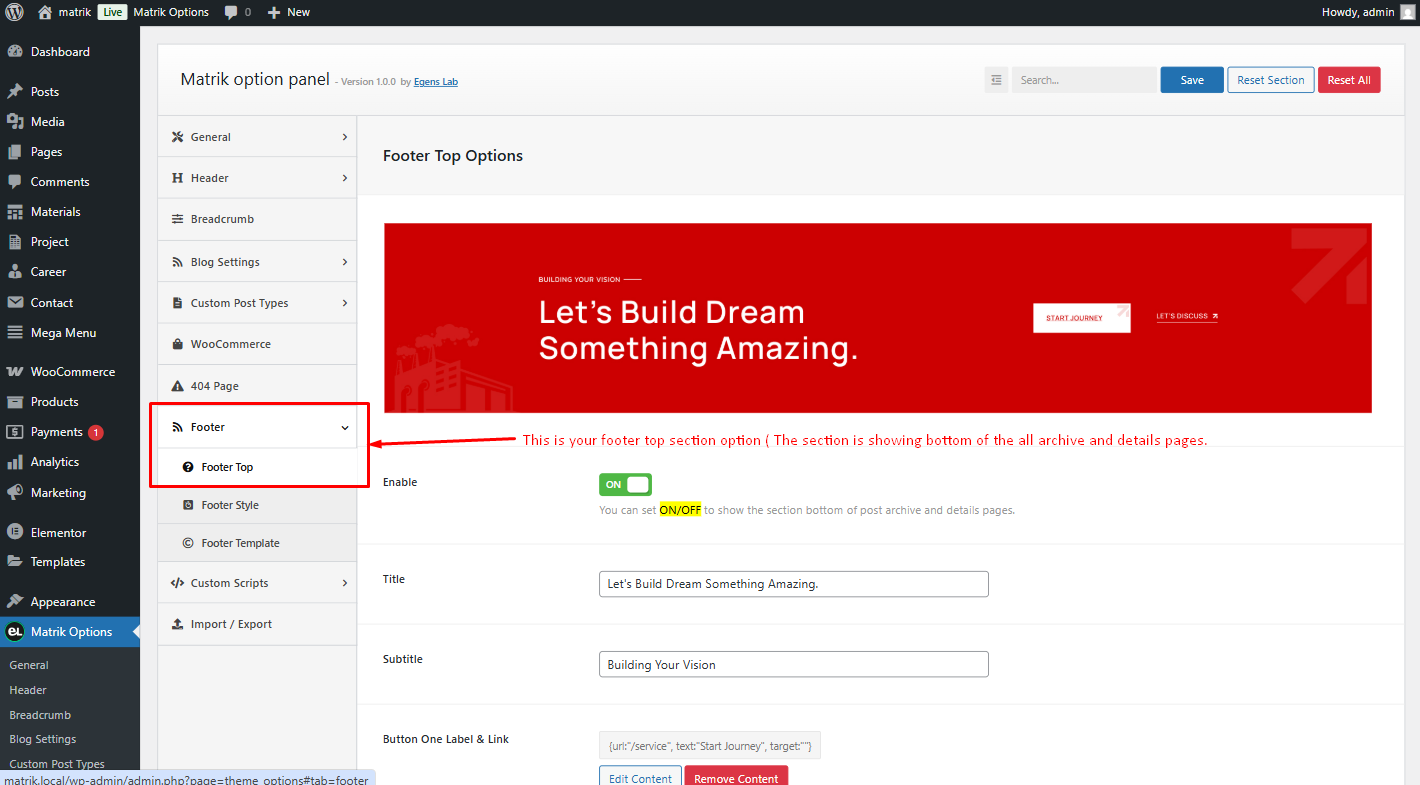
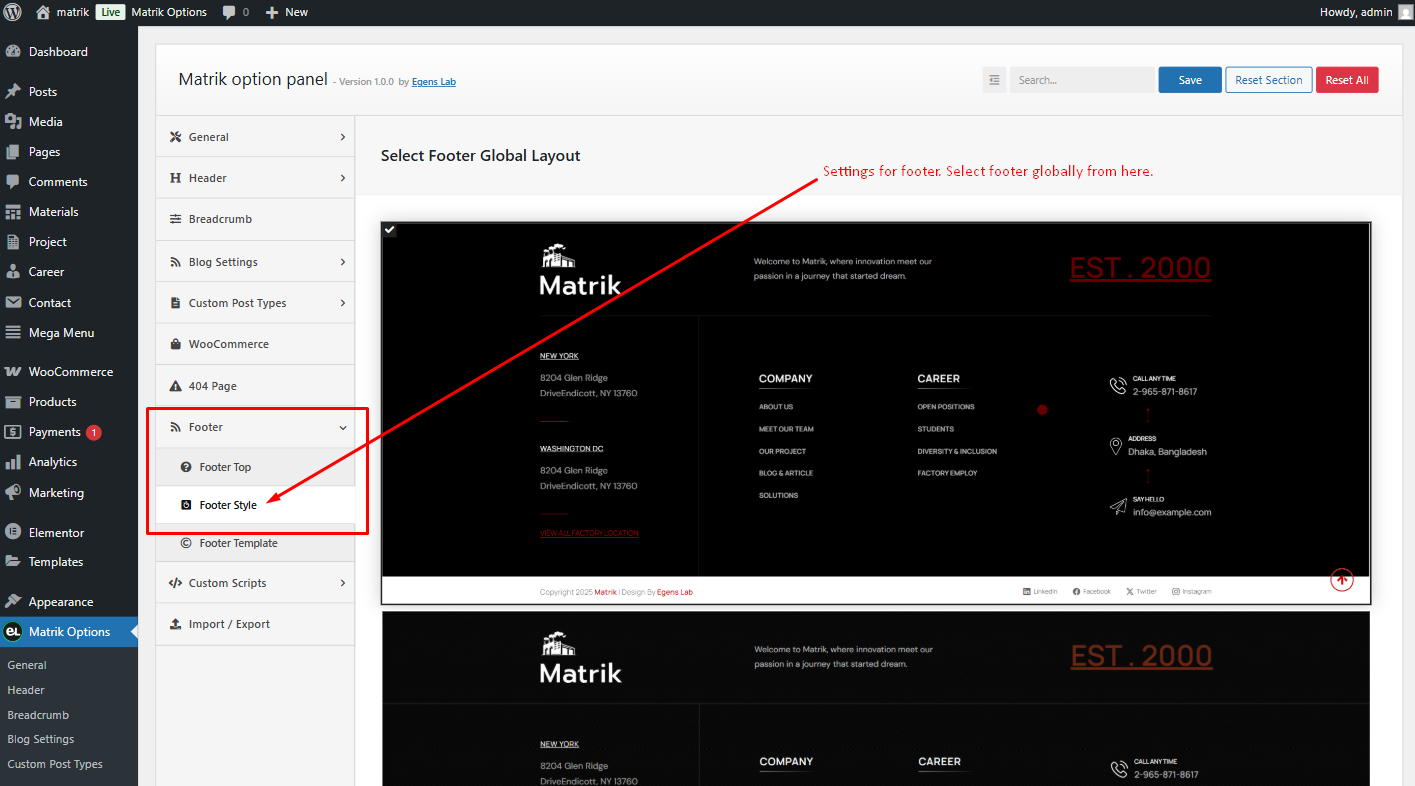
Theme Options Panel
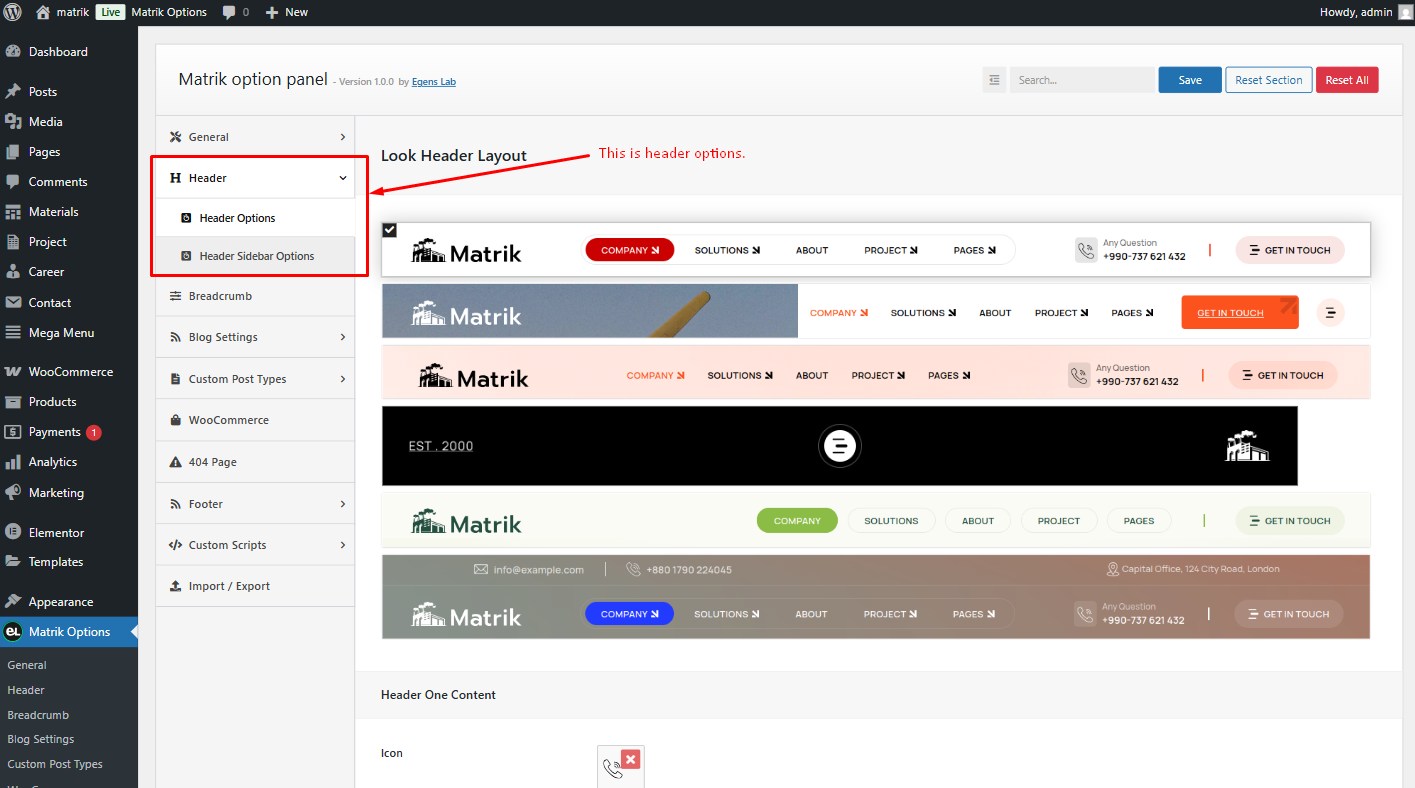
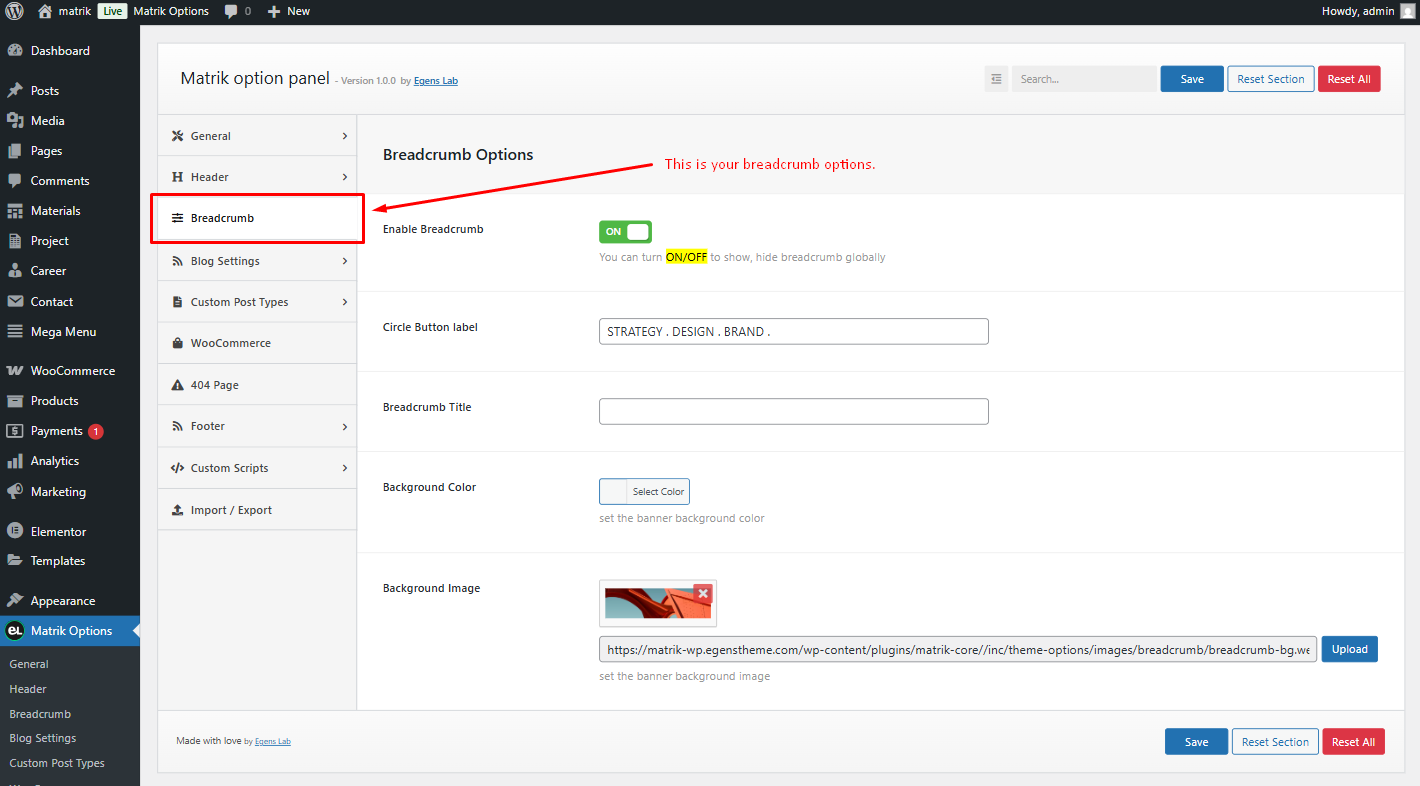
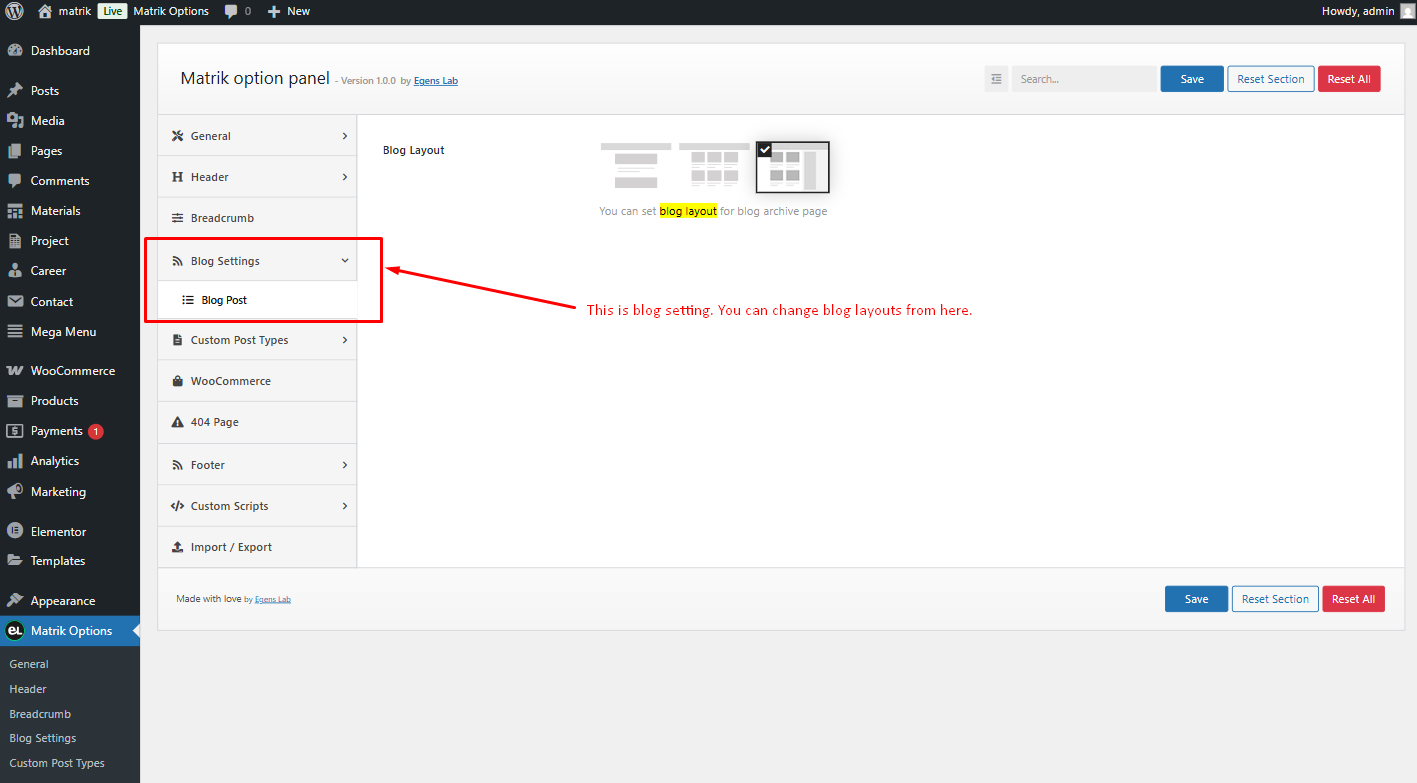
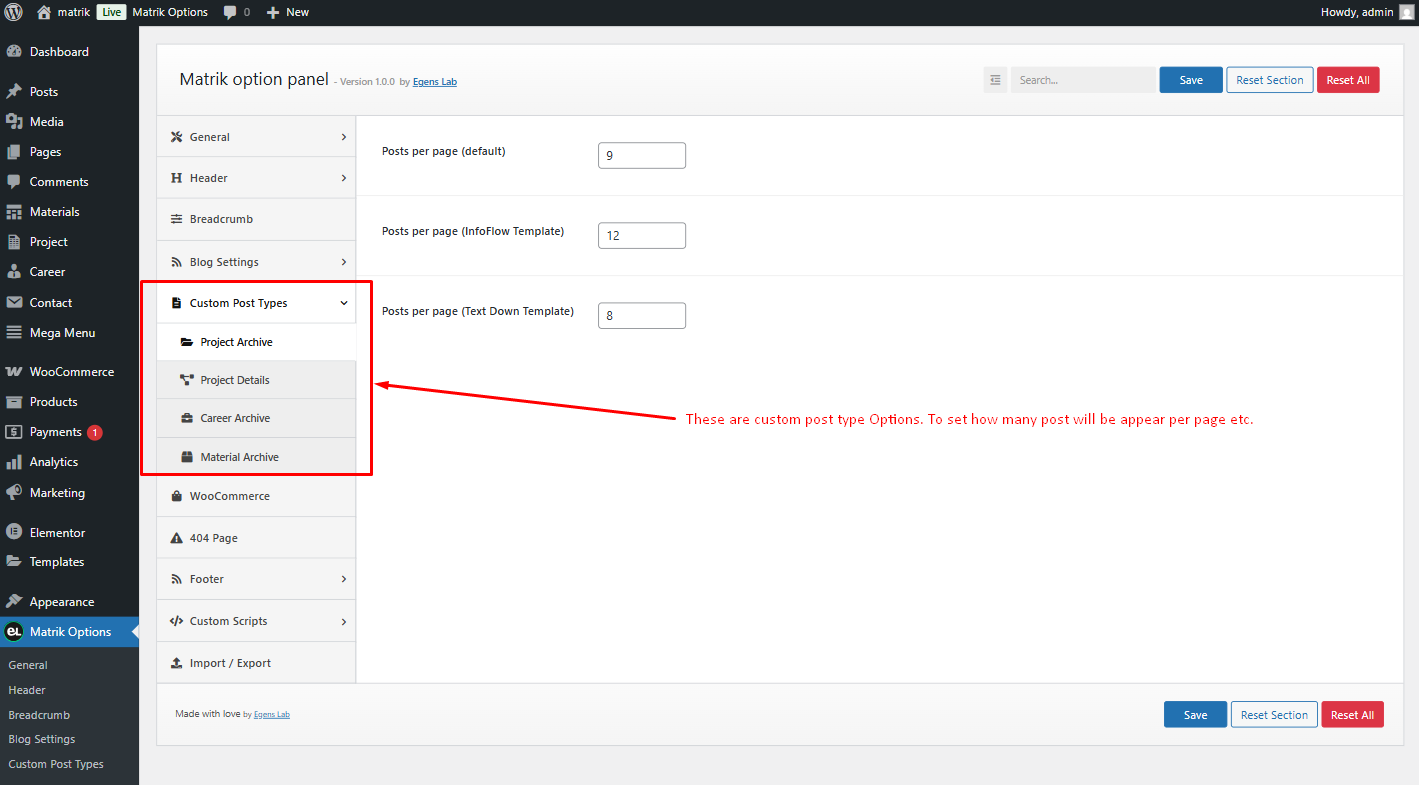
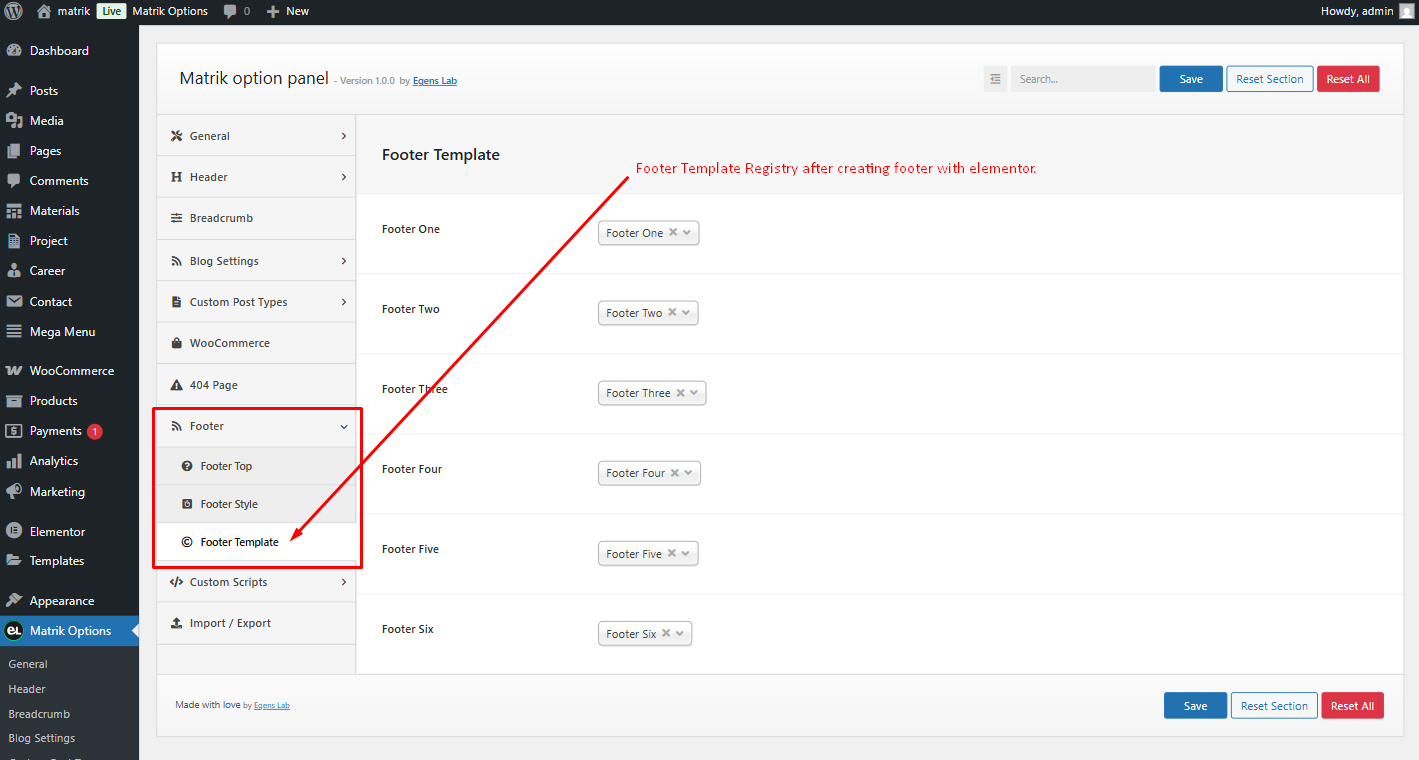
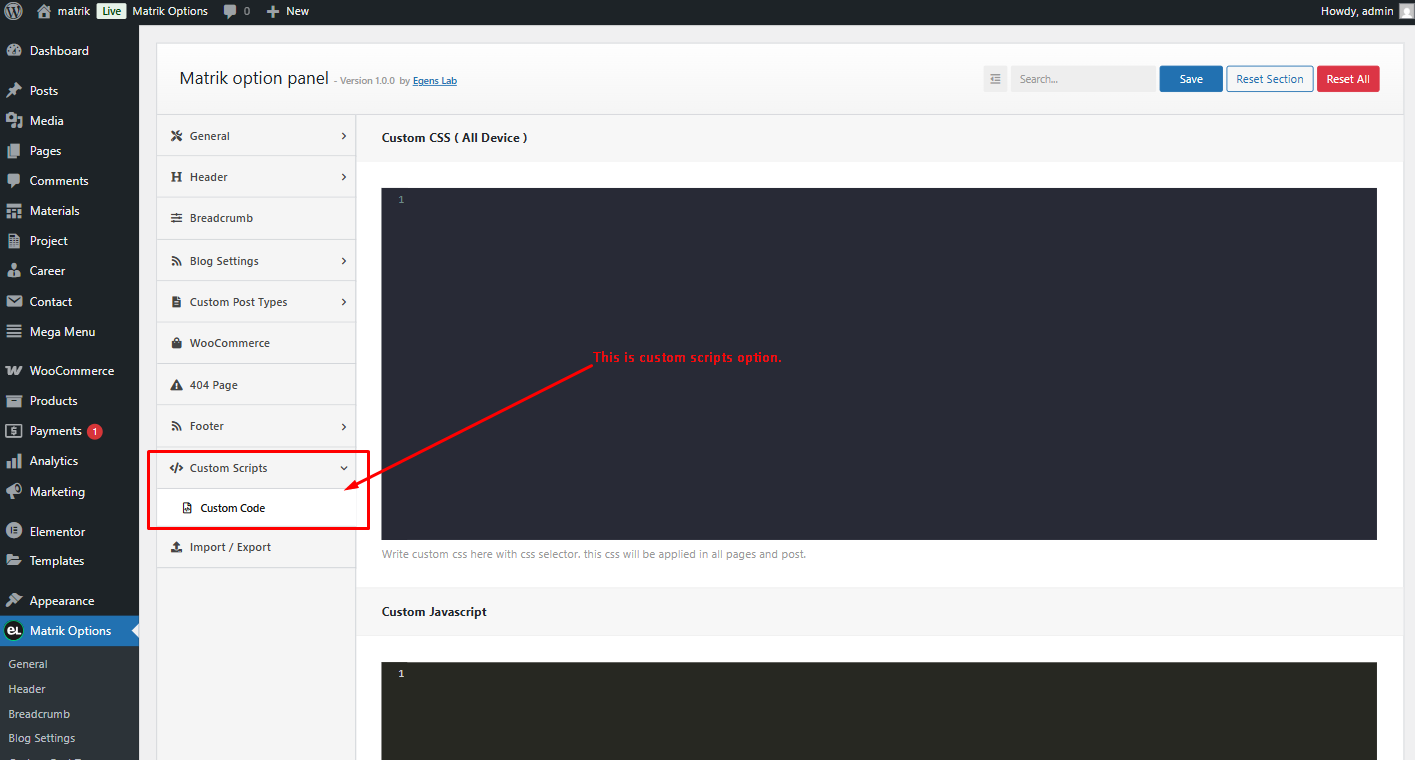
Follow these screenshot to change your theme layout from Theme Options
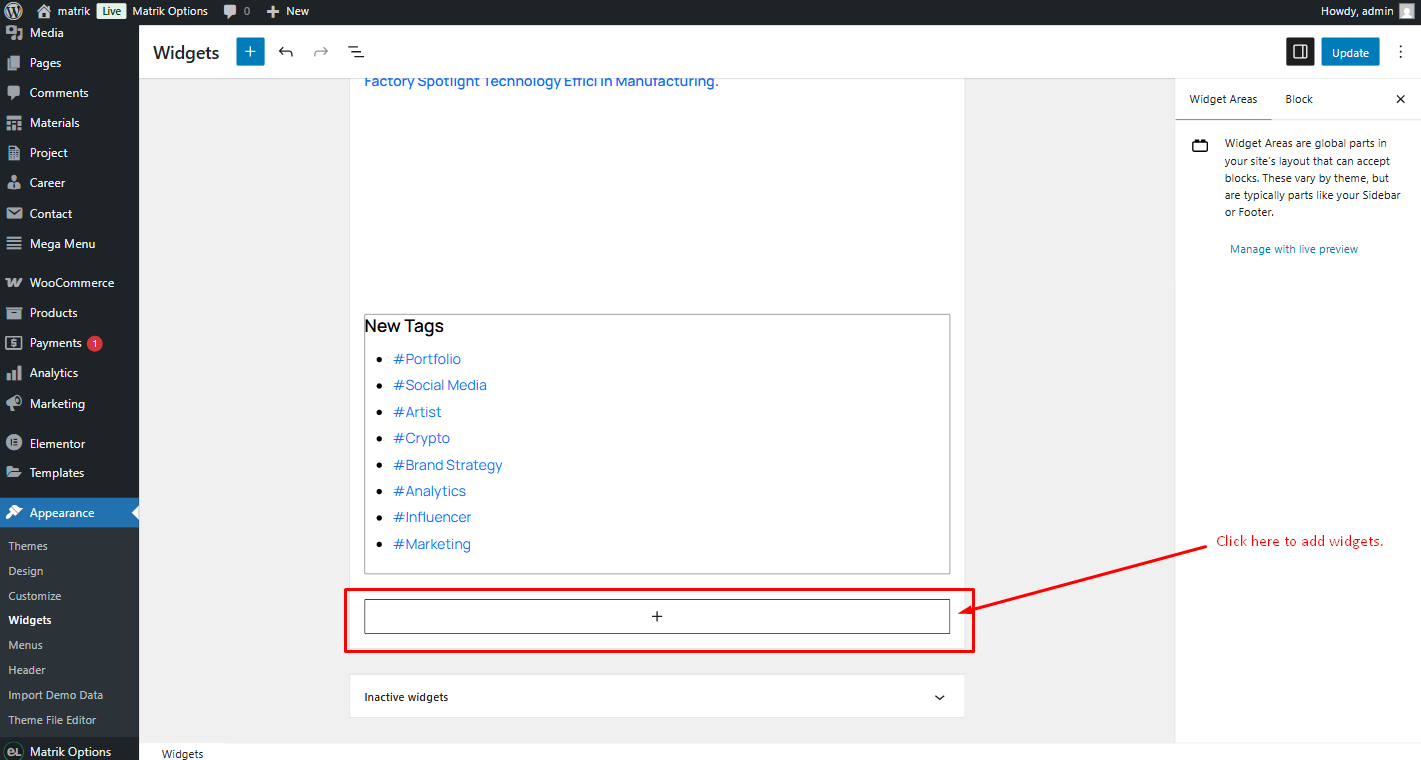
How to add widgets
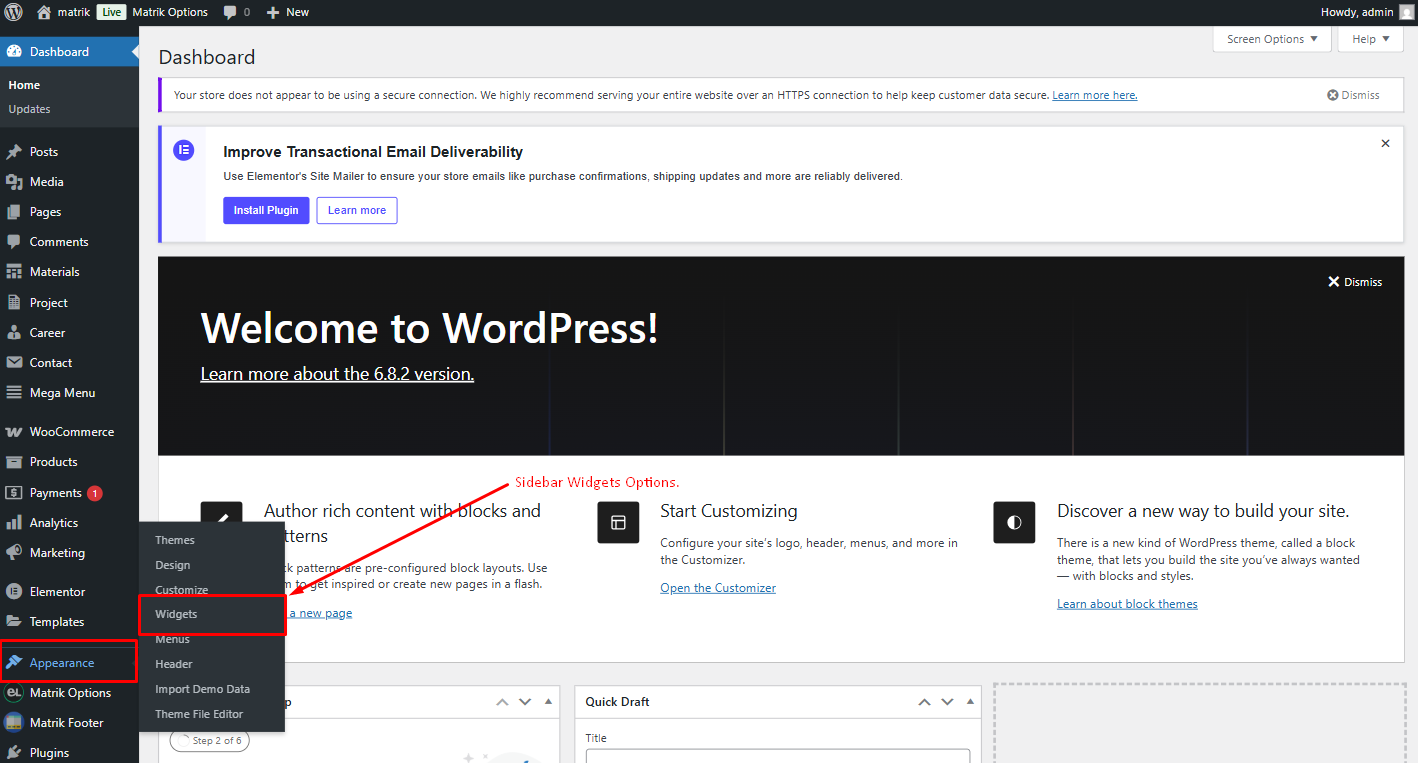
Step 1: Navigate Appearance > Widgets.
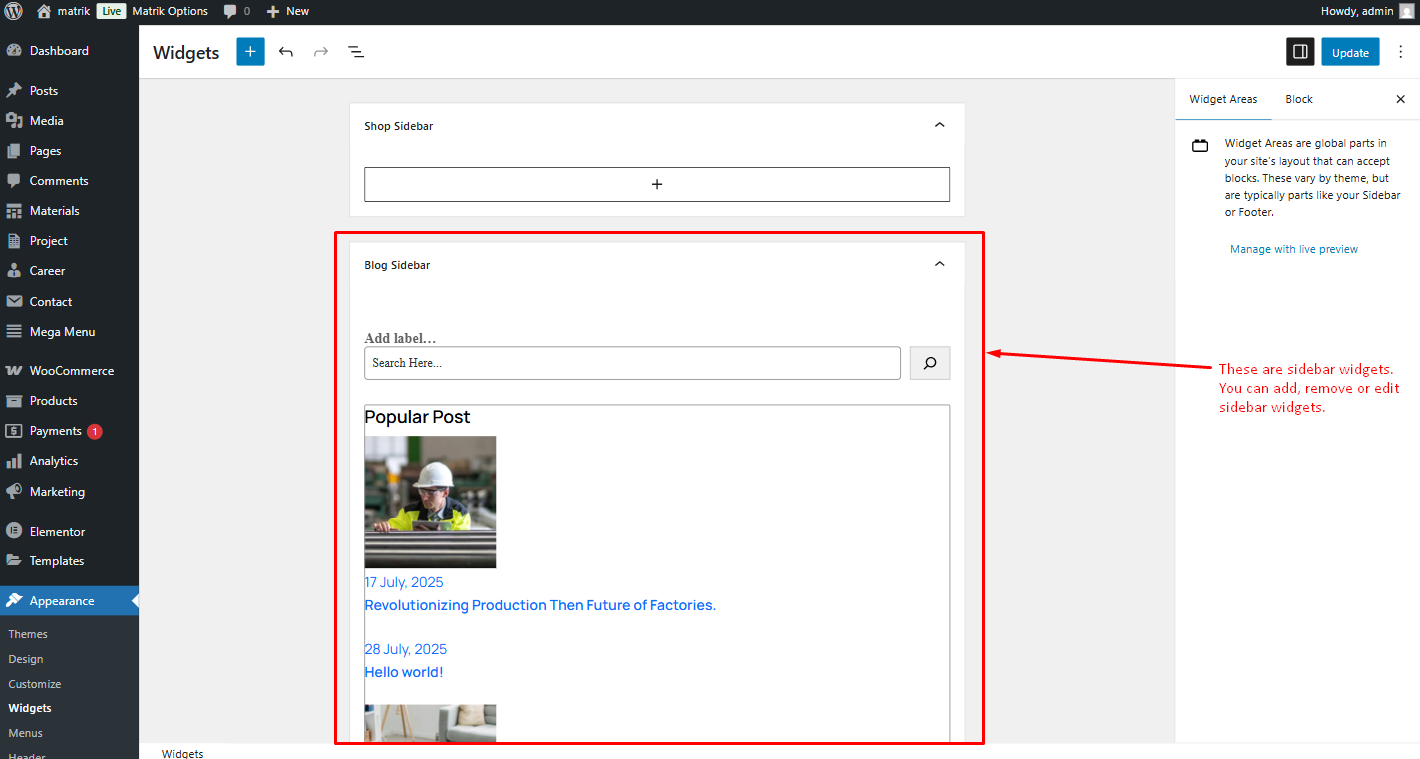
Step 2: You can see all the widget areas here.
How to edit a widget
Step 3: Click on Plus icon and search theme name to see all custom widget.
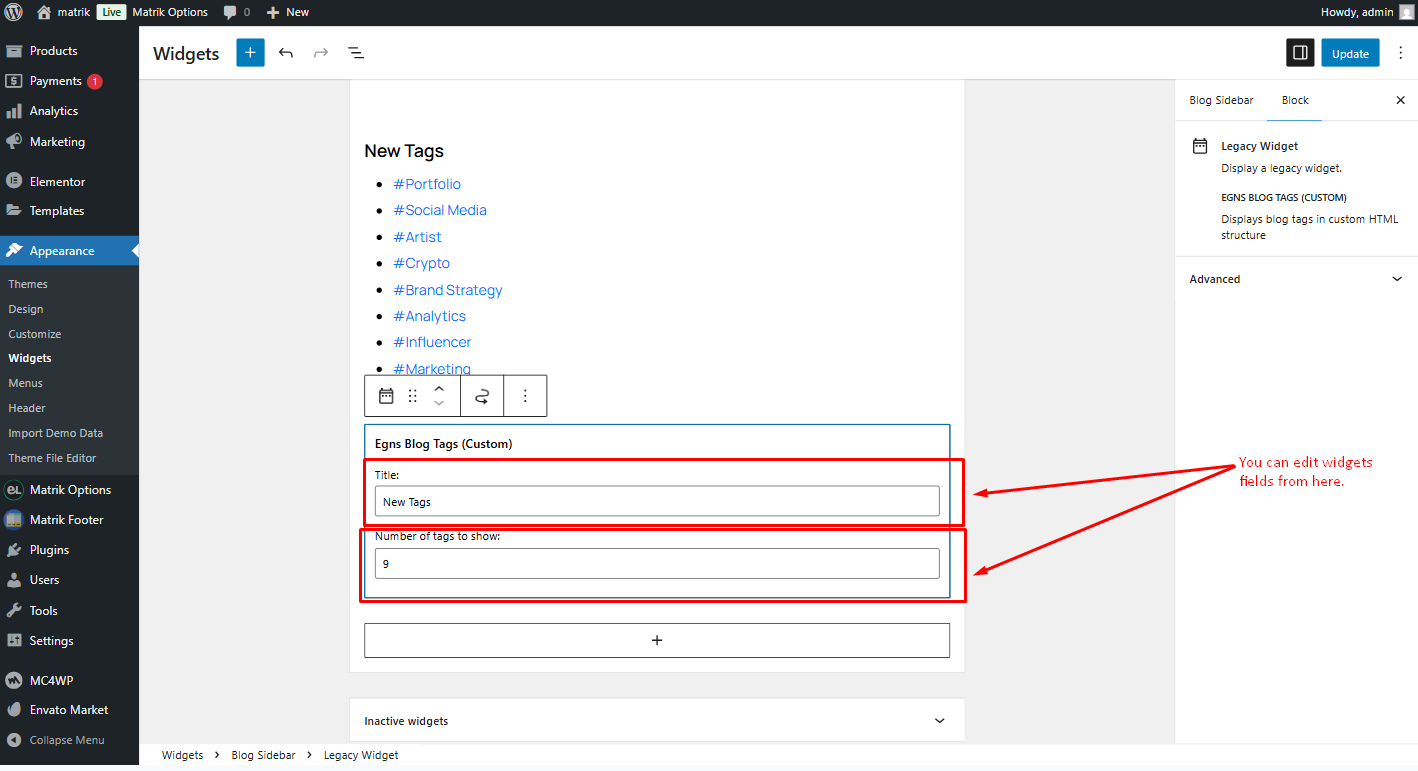
Step 4: Click on widget to edit them.
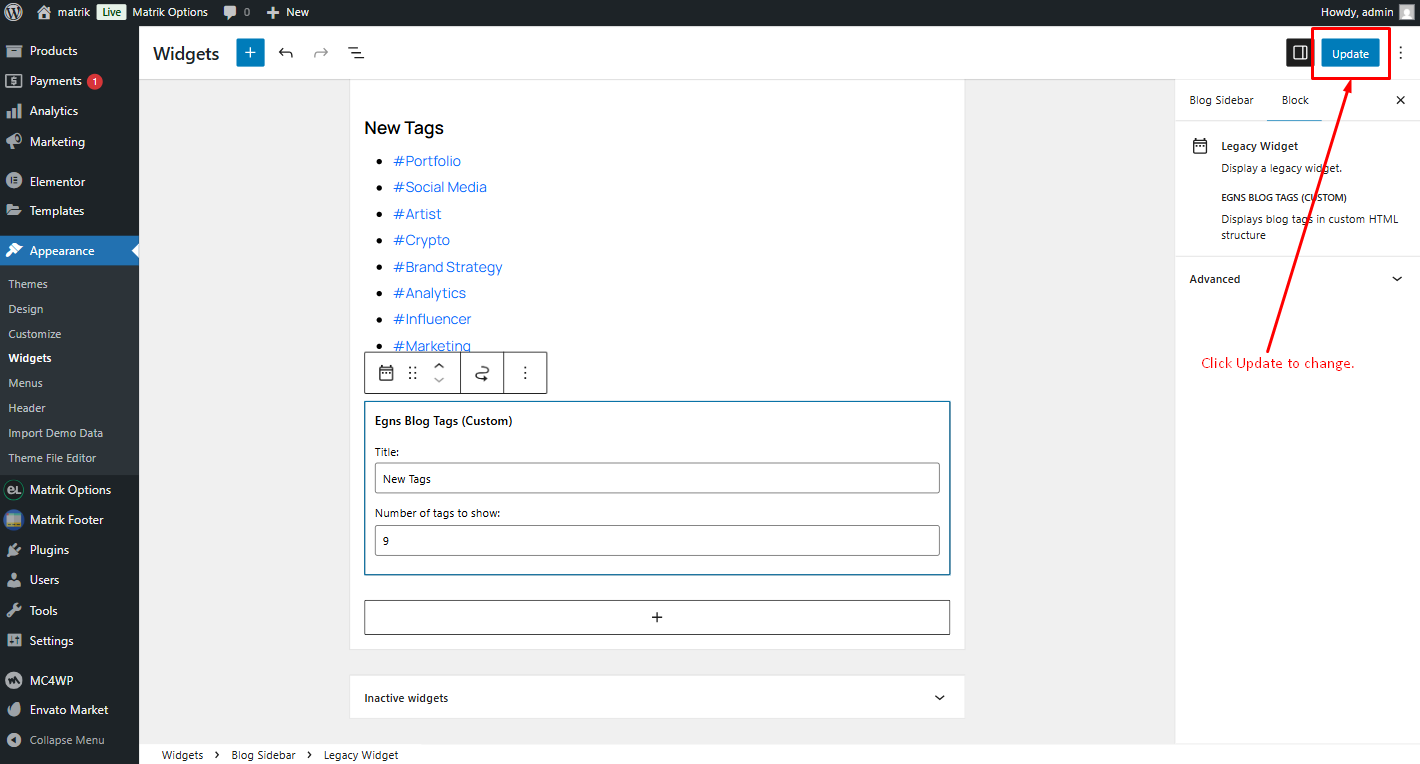
Step 6: After editing, click Update to save changes.
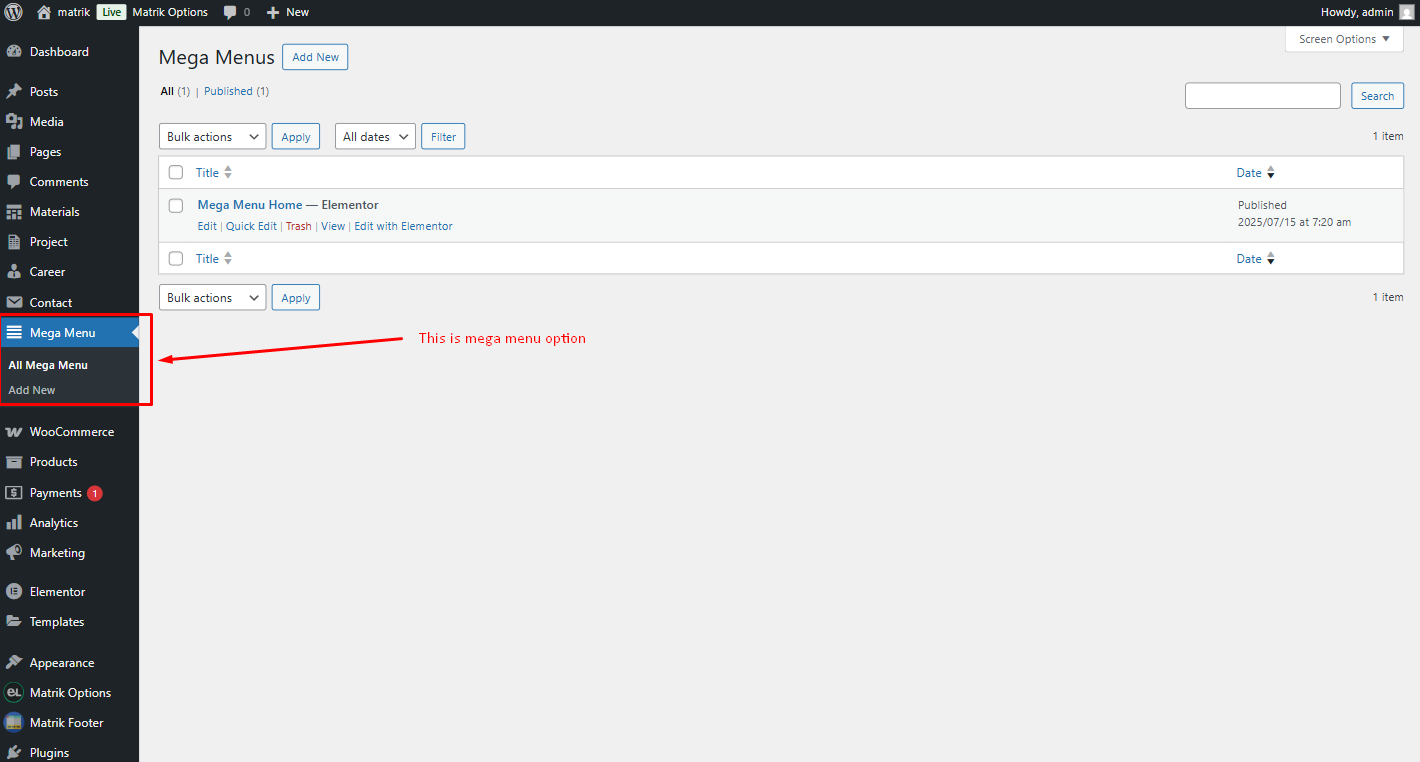
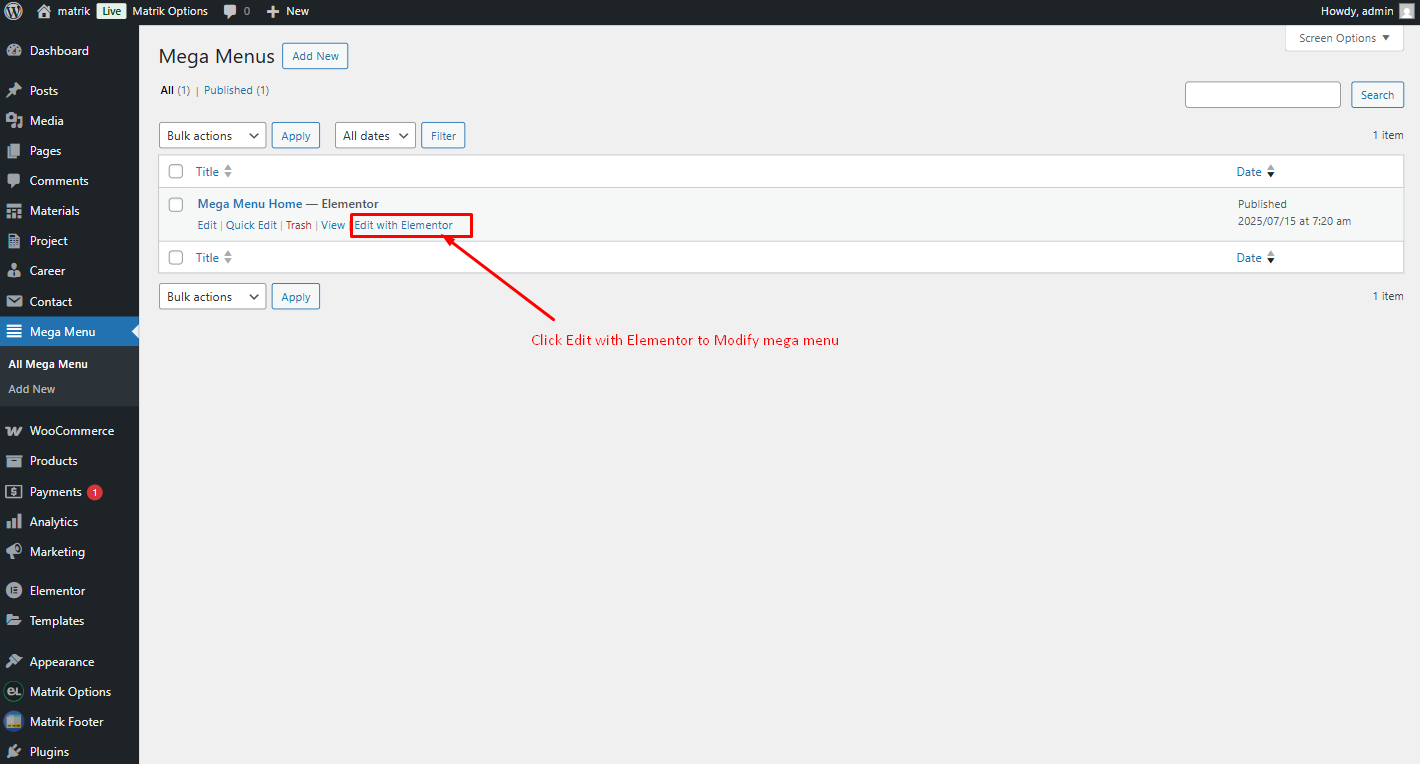
How to add Mega Menu
Step 1: Mega Menu Custom Post Type > Elementor edit.
Step 2: Edit Mega Menu With Elementor
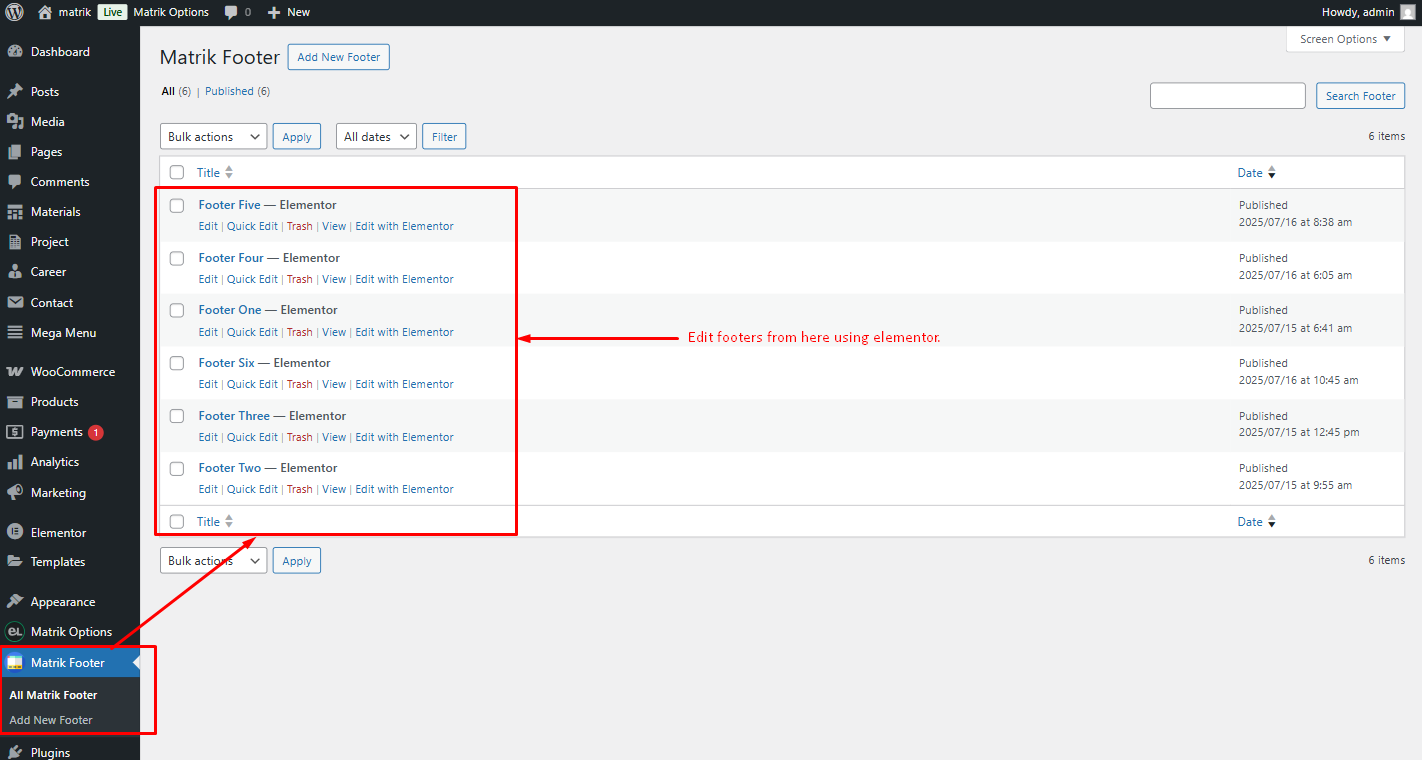
How to edit footer from footer blocks custom post type
Step 1: We have created a footer using the custom post type Footer Blocks. Additionally, we have developed a separate widget named EG Footer, which can be used in the footer with Elementor.
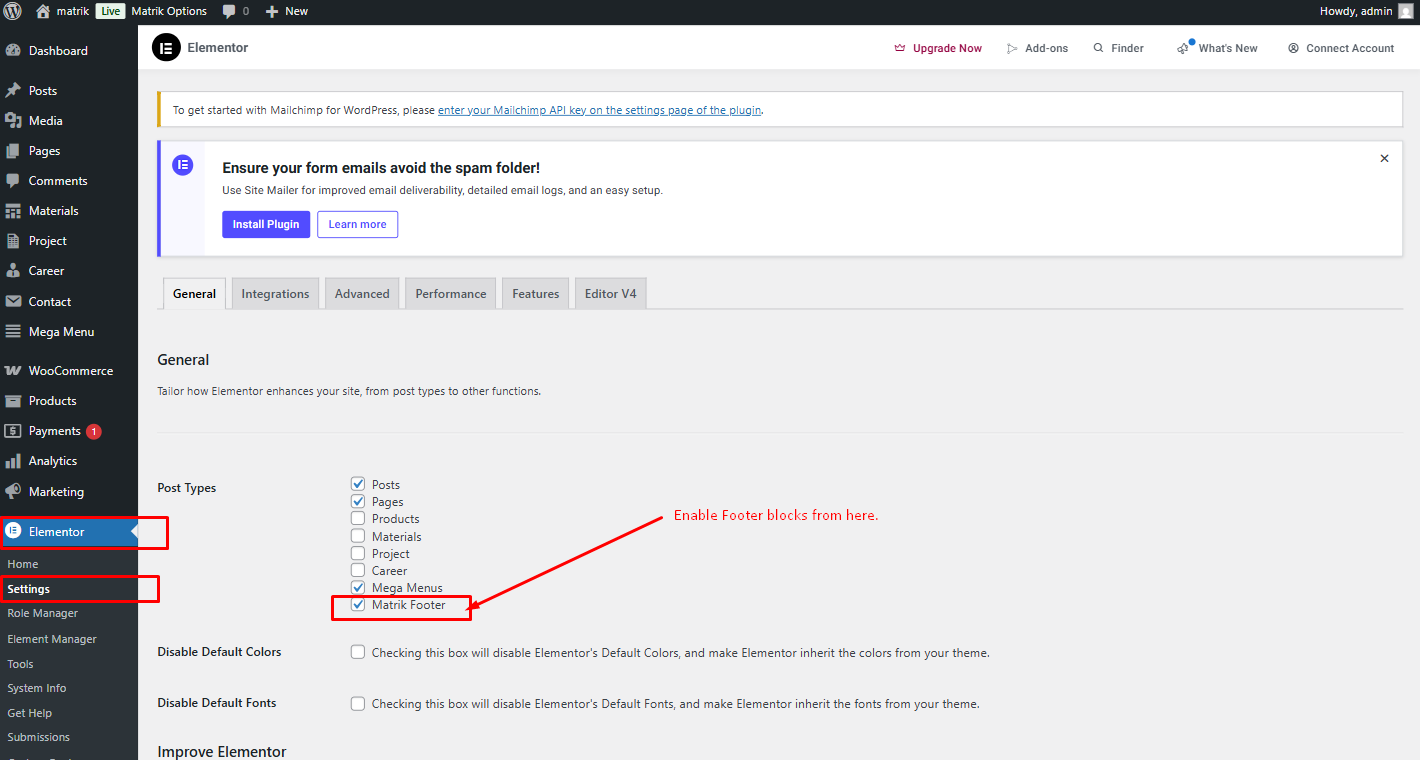
Step 2: Enable the footer blocks option in Elementor settings.
Theme Update Tutorial
There are two ways to update the theme. The regular and the automatic way.
Automatic
This is the easiest way to update a theme. You can do that by Envato Market Plugin. We already included this plugin with our theme. You need to install and activate the plugin and configure it with your themeforest profile. For configuring this plugin follow this tutorial article: http://www.wpexplorer.com/envato-market-plugin-guide/.
Manual
Go to your "Themeforest Download Account" and download the latest package. Unzip it and overwrite the theme folder on your server via a FTP Client.
Plugins
If the theme uses plugins and there are updates available for theme, you should see a notification and be able to easily install theme.However if you don't see the notification bar, you can update the plugins manually as well.
Plugins
Following list of packages will be included:
- Elementor Page Builder
- Egens Core
- Contact Form 7
- MC4WP: Mailchimp for WordPress
- One Click Demo Import
- SVG Support
- Woo-Commerce
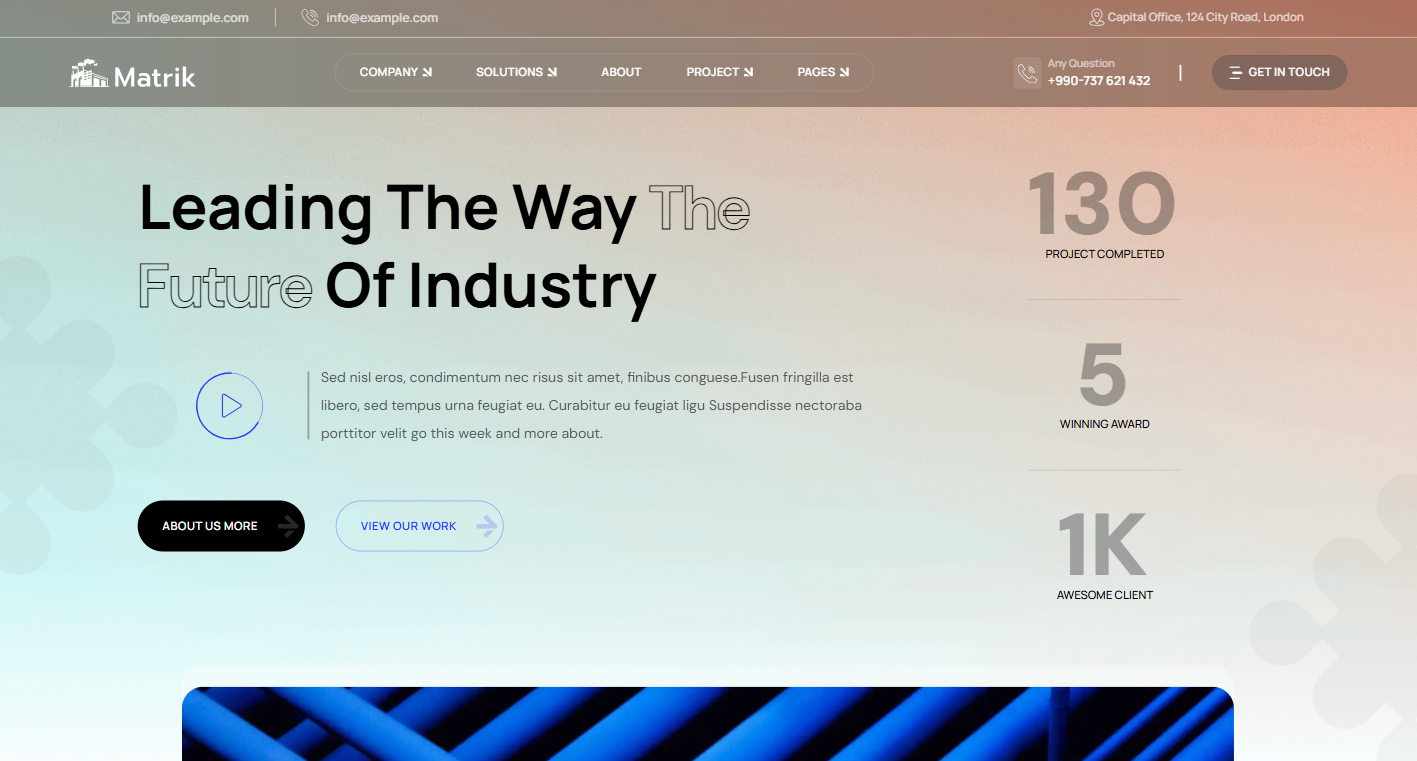
Home Page Demos





Source & Credits
Images:
- Unsplash - https://unsplash.com/
Icons:
- Icons Font Face - https://icons.getbootstrap.com
- Icons Font Face - https://boxicons.com
- Icons Font Face - https://fontawesome.com/icons
Scripts:
- jQuery - http://www.jquery.com/
- Bootstrap 5 - http://getbootstrap.com/
- swiperjs - https://swiperjs.com/get-started
- Magnific Popup - https://dimsemenov.com/plugins/magnific-popup
- Gsap - https://cdnjs.com/libraries/gsap
- Fancybox - https://fancyapps.com/
Support
If this documentation doesn't answer your questions, So, Please send us Email via Item Support Page
We are located in GMT +5: 30 time zone and we answer all questions within 12-24 hours in weekdays. In some rare cases the waiting time can be to 48 hours. (except holiday seasons which might take longer).
Don’t forget to Rate this template
Go to your Themeforest Profile > Downloads Tab > & then You can Rate & Review for our template.
Thank You.
More Templates
Checkout Our Premium Templates Below